

You’ve invested in cloud. Your infrastructure is scalable, your DevOps team moves fast, and your applications run globally. You’ve checked all the boxes on cloud adoption.
Then, in one moment, everything changes.
A researcher discovers a misconfigured AWS S3 bucket publicly accessible to the entire internet. Inside: 273,000 banking transaction records belonging to Indian customers. The breach happens not because attackers found a sophisticated vulnerability – but because someone forgot to set the bucket’s access control.
This isn’t hypothetical. In August 2025, UpGuard researchers uncovered exactly this scenario: a major Indian bank’s transaction data leaked across the internet due to a single misconfiguration. Weeks earlier, another misconfiguration exposed 2.73 lakh NACH transaction records. Before that, Oil India Limited accidentally exposed job seeker personal data through an improperly secured S3 bucket.
These aren’t anomalies. They’re the norm.
Nearly 99% of cloud security breaches are caused by preventable misconfigurations – not advanced exploits, not zero-days, not sophisticated APT campaigns. Organizations spend millions on firewalls and intrusion detection systems while leaving their most critical assets wide open through simple configuration errors.
The paradox: Cloud misconfigurations are simultaneously the most common breach vector and the easiest to prevent.
This comprehensive guide reveals everything you need to know about detecting, preventing, and remediating cloud misconfigurations in 2026 – across AWS, Azure, and GCP environments, with specific focus on RBI compliance requirements for Indian financial institutions and enterprises.
What is Cloud Misconfiguration & Why Does It Happen at Scale?
Cloud misconfiguration occurs when security settings, access controls, encryption policies, logging mechanisms, or identity permissions are not correctly configured in cloud environments, leaving data and resources vulnerable to unauthorized access, manipulation, or exposure.
Unlike traditional on-premises infrastructure – where systems remain relatively static and changes are deliberate and documented – cloud environments are dynamic, fluid, and rapidly evolving. Developers provision resources in seconds. Infrastructure as Code (IaC) gets deployed automatically. Third-party integrations are added via APIs. In this velocity, configuration errors compound exponentially.
A misconfigured S3 bucket isn’t a rare accident. It’s a predictable outcome of complexity at scale.
Why Cloud Misconfigurations Are Inevitable (And Why That Changes Everything)
1. Default Insecurity
Cloud services ship with default configurations optimized for ease of use, not security. An AWS S3 bucket created today arrives with public access disabled – but that’s a recent change. For years, S3 buckets defaulted to public-readable. Developers accustomed to that default behavior still create buckets without thinking about access controls.
2. Sprawl & Visibility Gaps
The average mid-size enterprise now manages 200+ cloud services across AWS, Azure, and GCP simultaneously. A single DevOps team might manage 300+ cloud accounts. Manual configuration audits at that scale are impossible. Misconfigurations hide in blind spots; accounts no one remembers creating, services deployed in regions teams weren’t aware existed.
3. Pressure to Move Fast
DevOps teams are incentivized to deploy fast. Security reviews slow deployment. In competitive industries, the team that deploys 10x faster wins market share. So security gets deferred: “We’ll fix configurations later.” Later never comes. The misconfiguration becomes production.
4. Fragmented Tooling
Security, DevOps, and compliance teams use different tools. Security scans the cloud post-deployment. DevOps manages IaC in a separate system. Compliance tracks audit logs independently. No single team sees the complete picture. A configuration that passes the DevOps review fails the security audit; but no one catches it until a breach occurs.
5. Configuration Drift
Even well-intentioned teams create misconfigurations. A network administrator manually adjusts a security group to “temporarily” allow outbound traffic for a database migration. The temporary change becomes permanent because no one tracks it. Months later, security reviews the configuration and sees a deviation from the intended state – but by then, attackers may have already discovered it.
6. Compliance Confusion
RBI guidelines require certain configurations. PCI-DSS demands others. HIPAA and GDPR add additional requirements. When regulations conflict or evolve, teams make judgment calls. Some configurations get relaxed to meet other compliance requirements, creating security gaps.
The root cause isn’t negligence. It’s inevitable complexity. At cloud scale and DevOps velocity, misconfigurations are a mathematical certainty unless actively prevented.
The Top 10 Cloud Misconfigurations Destroying Indian Enterprises
1. Publicly Accessible Storage Buckets
The Problem: Storage buckets configured to allow public read or write access, exposing sensitive data to anyone on the internet.
Real-World Impact in India
- August 2025: 273,000 Indian banking transaction records exposed via misconfigured S3 bucket
- September 2025: 2.73 lakh (273,000) NACH payment records leaked through public storage
- Capital One (2019): 100+ million credit applications exposed globally
- Accenture (2017): API keys and authentication credentials found in public S3 buckets
Why It Happens: Developers enable public read/write accidentally. Security groups default to permissive. Teams forget to disable public access when testing.
Detection: Automated CSPM tools continuously scan buckets for public access policies. Manual methods: AWS S3 Block Public Access settings, Azure Storage Account firewall settings.
Prevention
- Enable “Block all public access” by default across all buckets
- Use bucket policies requiring authentication
- Implement bucket versioning and MFA delete protection
- Regular audits via automated tools
2. Overly Permissive IAM Roles (Privilege Escalation via Misconfigured Permissions)
The Problem: IAM roles granting wildcard permissions (s3:, iam:, ec2:*) instead of least-privilege specific actions.
Real-World Impact
- Attackers assume a compromised service account with admin-like permissions
- Lateral movement across entire cloud infrastructure becomes trivial
- Data exfiltration from multiple services possible from single compromised identity
- Privilege escalation becomes one API call away
Example Misconfiguration
{
  "Effect": "Allow",
  "Action": "iam:*",
  "Resource": "*"
}
An attacker with this role can modify any IAM policy, create new admin accounts, grant themselves permissions to any service.
Why It Happens
- Copy-paste from documentation or StackOverflow
- “Temporary” permissions for troubleshooting become permanent
- Insufficient understanding of IAM least-privilege principles
Detection
- CSPM tools flag roles with wildcard actions
- Behavioral analytics detect unusual permission escalation attempts
- Regular access reviews identify unused permissions
Prevention
- Start with minimal permissions
- Use IAM policy simulator before deployment
- Automate policy reviews in CI/CD pipeline
- Remove unused roles monthly
3. Disabled Encryption (At-Rest & In-Transit)
The Problem: Sensitive data stored or transmitted without encryption, violating compliance and exposing data if storage is breached or network traffic intercepted.
Azure Statistics: 60.75% misconfiguration rate on Azure Storage Accounts (306,433 misconfigurations identified)
Real-World Impact
- Unencrypted databases breached → customer data exposed in plaintext
- Network traffic intercepted → credentials and API keys captured
- Backup snapshots left unencrypted → attackers access historical data
Why It Happens
- Encryption adds slight performance overhead (negligible in modern systems, but perception persists)
- Default settings sometimes leave encryption disabled
- TLS/SSL setup complexity discourages implementation
- Perceived cost of encryption licensing (most cloud providers now offer free encryption)
Detection
- CSPM tools scan for unencrypted volumes, databases, and storage
- Network traffic analysis detects unencrypted protocols (plain HTTP, unencrypted databases)
Prevention
- Enable encryption by default for all data stores
- Enforce TLS 1.2+ for all network communication
- Use cloud provider-managed encryption keys by default
- Audit encryption settings monthly
4. Weak or Missing Authentication & MFA
The Problem: Accounts without multi-factor authentication, allowing attackers to access resources using stolen credentials.
RBI Compliance Requirement: Mandatory MFA for all critical activities and privileged accounts
Real-World Impact
- Compromised service account credentials allow account takeover
- Credential stuffing attacks succeed because MFA isn’t enforced
- Insider threats amplified when weak authentication enables account hijacking
Why It Happens
- MFA perceived as friction reducing developer velocity
- Weak passwords accepted due to insufficient validation
- Service accounts created without MFA (technically infeasible for some use cases, but unnecessary for others)
Detection
- CSPM tools identify accounts without MFA
- Behavioral analytics detect multiple failed login attempts from new locations
- Audit logs reveal authentication bypass attempts
Prevention
- Enforce MFA for all human accounts and privileged service accounts
- Implement passwordless authentication (WebAuthn, Windows Hello)
- Rotate service account credentials regularly
- Disable accounts with weak passwords automatically
5. Misconfigured Network Security Groups (Unrestricted Ports)
The Problem: Inbound rules allowing traffic from 0.0.0.0/0 (entire internet) to high-risk ports (SSH 22, RDP 3389, database ports 3306, 5432).
Azure VM Misconfiguration Rate: 61.49% (158,406 misconfigurations out of 257,599 checks)
Real-World Impact
- SSH brute-force attacks directly accessing EC2 instances
- Database ports exposed to the internet, allowing direct connection attempts
- RDP exposure enabling ransomware deployment
Why It Happens
- Temporary rules for debugging left permanent
- Template-based deployments with overly permissive defaults
- Lack of network segmentation forcing broad access for convenience
Detection
- CSPM tools flag “0.0.0.0/0” rules on sensitive ports
- Automated port scanning identifies exposed services
- Traffic analysis reveals unexpected inbound connections
Prevention
- Restrict access to specific IP ranges or security groups
- Implement zero-trust network access (VPN, bastion hosts)
- Remove default rules allowing all inbound traffic
- Regular security group audits
6. Exposed Access Keys & API Credentials
The Problem: Long-lived access keys, API credentials, and secrets committed to code repositories or stored in plaintext configuration files.
Detection Methods
- Credential scanning tools (git-secrets, TruffleHog) scan repositories for patterns matching API keys
- CSPM tools identify long-lived credentials unused for 90+ days
- Automated secret detection in container images
Real-World Impact
- Exposed AWS access key IDs allow attackers to enumerate EC2 instances and S3 buckets
- GitHub-committed credentials become permanent public records (even after deletion)
- Service account API keys enable unauthorized API calls
Why It Happens
- Developers copy credentials for local testing and forget to remove them before committing
- Configuration management tools store secrets in plaintext
- Lack of secrets management infrastructure (AWS Secrets Manager, Azure Key Vault)
Prevention
- Never commit credentials to version control
- Use temporary credentials and session tokens
- Implement secrets management (vault-style systems)
- Rotate credentials regularly (AWS recommends every 90 days)
- Enable MFA delete protection on sensitive data
- Automated secret scanning in CI/CD pipeline
7. Disabled Monitoring & Logging
The Problem: Audit logs, application logs, or security monitoring disabled, preventing detection of attacks or unauthorized access.
AWS CloudTrail Misconfiguration: 100% misconfiguration rate in enterprise audits
RBI Requirement: Continuous audit logging for compliance and incident investigation
Real-World Impact
- Attacker activity goes undetected because logs aren’t being recorded
- Forensic investigation impossible after breach
- Compliance audit failures due to missing audit trails
Why It Happens
- Logging adds storage cost (though minimal in modern systems)
- Log volume creates noise, making investigation harder
- Perceived performance impact discourages comprehensive logging
- Logging setup requires centralized infrastructure
Detection
- CSPM tools verify that CloudTrail, Azure Monitor, and GCP Cloud Audit Logs are enabled
- Alerts trigger if logging is disabled or logs are being deleted
Prevention
- Enable logging by default for all cloud resources
- Centralize logs in immutable security data lake
- Protect logs with write-once policies
- Set up alerts for deletion attempts
- Retention: minimum 1 year for compliance
8. Default Security Settings Left Unchanged
The Problem: Cloud services deployed with default configurations, which often prioritize ease of use over security.
Examples
- PostgreSQL databases with default passwords
- Kubernetes API servers with insecure ports enabled
- Database backups without encryption
Azure Advisor Misconfiguration: 100% misconfiguration rate (94,095 unaddressed recommendations)
Real-World Impact
- Known default credentials allow unauthorized database access
- Insecure API server ports allow cluster takeover
- Unencrypted backups leak historical data
Why It Happens
- Assumption that defaults are “good enough”
- Deployment automation uses template defaults
- Lack of security hardening checklist
Prevention
- Create security baselines (CIS Benchmarks for AWS, Azure, GCP)
- Automate hardening in deployment pipeline
- Regular configuration audits against baselines
- Document deviations with business justification
9. Missing Data Loss Prevention (DLP) Policies
The Problem: No policies preventing unauthorized data exfiltration, allowing attackers to copy sensitive data without detection.
Real-World Impact
- Attackers copy PII, financial records, or trade secrets without triggering alerts
- Insider threats exfiltrate data undetected
- Compliance violations due to unmonitored data movement
Prevention
- Implement DLP policies on storage buckets and databases
- Monitor and alert on large data movements
- Restrict data transfer to approved destinations
- Classify data and apply appropriate DLP rules
10. Configuration Drift (Untracked Manual Changes)
The Problem: Infrastructure changes deployed manually outside of IaC, creating discrepancies between the declared (IaC) and actual (cloud) state.
The Risk
- Security patches applied manually but not reflected in IaC
- Network rules changed for “temporary” troubleshooting become permanent
- Drift creates orphaned resources and inconsistencies
- Future deployments may overwrite manual changes, breaking dependencies
Example Drift Scenario
IaC declares: S3 bucket encryption enabled, bucket versioning enabled
Actual cloud state: Encryption enabled, but versioning disabled (admin disabled manually)
Result: Divergence creates compliance violation and vulnerability
Why It Happens
- Ad-hoc troubleshooting creates manual changes
- Lack of drift detection means no one knows changes happened
- DevOps velocity encourages manual shortcuts to avoid IaC update delays
- Fragmented teams (infrastructure, security, database) make independent changes
Detection
- Drift detection tools compare IaC to cloud state
- Regular terraform plan or equivalent shows divergences
- CSPM tools detect unauthorized changes
Prevention
- Enforce immutable infrastructure (all changes via IaC)
- Prohibit manual changes via cloud console
- Implement drift detection with automated alerts
- Auto-remediation to restore desired state
- Regular audits and change approvals
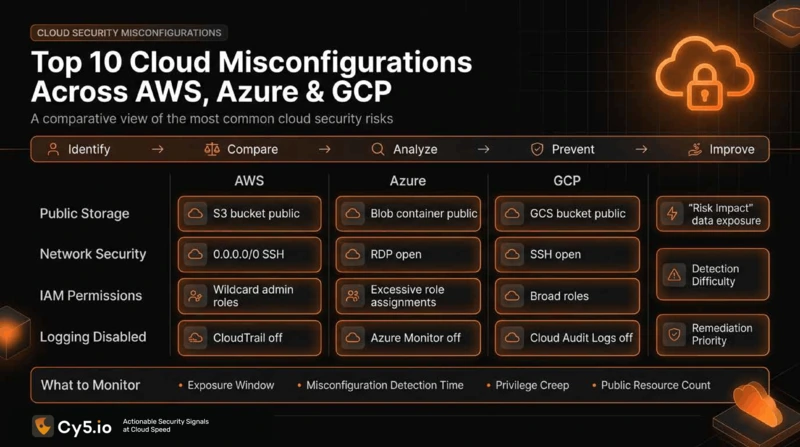
Cloud Provider-Specific Misconfigurations: AWS, Azure & GCP
AWS Misconfigurations
1. S3 Bucket Misconfiguration (Most Common)
- Public read/write permissions
- Blocked public access settings not enabled
- Versioning disabled (no recovery from malicious deletion)
2. EC2 Security Group Misconfiguration
- 0.0.0.0/0 inbound on SSH (port 22) or RDP (port 3389)
- Database ports exposed to internet
3. RDS Encryption
- Encryption at rest disabled
- Backup encryption disabled
- Unencrypted snapshots
4. IAM Policy Issues
- Root account with active access keys
- Cross-account roles without proper trust policies
- Unused permissions retained
Detection & Prevention
- Use AWS Config rules for continuous monitoring
- Enable AWS Security Hub for centralized visibility
- Implement AWS Systems Manager Session Manager (no SSH access needed)
Azure Misconfigurations
1. Storage Account Public Access
- Anonymous access to blob containers enabled
- Shared access signatures (SAS) not expiring
- Storage account firewall rules allowing all networks
2. Virtual Machine Security
- RDP/SSH access from 0.0.0.0/0
- Just-in-time (JIT) access not enabled
- Unencrypted OS disks
3. Database Configurations
- PostgreSQL/MySQL without connection encryption
- Database firewall allowing all IPs
- Auditing disabled
4. Azure Policy Non-Compliance
- Azure Advisor recommendations ignored
- Policy definitions not enforced
Detection & Prevention
- Enable Azure Advisor for continuous recommendations
- Use Azure Policy to enforce security baselines
- Deploy Azure Security Center for centralized monitoring
GCP Misconfigurations
1. Cloud Storage Misconfiguration
- AllUsers or AllAuthenticatedUsers roles on buckets
- Public sharing enabled unnecessarily
- Object versioning disabled
2. Compute Engine Security
- Default service account used for workloads
- SSH access from 0.0.0.0/0
- Shielded VM features disabled
3. IAM Role Issues
- Roles with excessive permissions assigned to service accounts
- Owner roles granted to service accounts
- Federated identity not validated
Detection & Prevention
- Use GCP Cloud Asset Inventory for visibility
- Enable GCP Security Command Center
- Implement GCP VPC Service Controls for isolation
The Real Cost of Misconfigurations: What Indian Enterprises Are Actually Paying
Financial Impact
1. Direct Breach Costs
- Average data breach in India: $2.18 million (2023-2024)
- Per-record cost: $50-$150 depending on data sensitivity
- Banking sector breaches: Add 3-5x multiplier due to regulatory fines and customer compensation
2. Regulatory Fines
- RBI penalties: Up to ₹5 crore for breach failures
- PCI-DSS non-compliance: $100,000 annual fines (payment companies)
- GDPR violations: Up to €20 million or 4% of global revenue (Indian subsidiaries of global companies)
3. Operational Costs
- Incident response team: ₹50-100 lakh per incident
- Forensic investigation: ₹30-50 lakh
- Remediation and hardening: ₹1+ crore for enterprise scale
4. Reputational Damage
- Customer churn: 5-15% post-breach
- Stock price decline: 5-20% (listed companies)
- Recovery time: 2-5 years to rebuild trust
Real Example: Oil India Misconfiguration (2025)
Exposure: Job seeker PII in misconfigured S3 bucket
Affected: Thousands of applicants
Data: Resumes, application forms, contact information
Timeline: July 2023 discovery, September 2023 remediation, May 2024 public disclosure
Lesson: Even well-intentioned disclosure takes months; reputational damage lingered
How to Detect Cloud Misconfigurations: Methods & Tools
Manual Detection Methods
1. Cloud Console Audit
- Review bucket access policies manually
- Check IAM roles and permissions
- Verify encryption settings
- Limitation: Impractical at scale (100+ accounts = 1000+ configurations)
2. CLI-Based Scanning
# AWS: Check S3 buckets for public access
aws s3api get-bucket-acl --bucket my-bucket
aws s3api get-bucket-policy-status --bucket my-bucket


# Azure: Check storage accounts
az storage account show --name mystorageaccount --query "networkRulesBypassOptions"

# GCP: List IAM bindings
gcloud projects get-iam-policy PROJECT_ID
Limitation: Requires manual effort; easily missed configurations
Threat Detection: CSPM (Cloud Security Posture Management) Tools
What is CSPM?
Cloud Security Posture Management (CSPM) platforms continuously scan cloud environments for misconfigurations, compliance violations, and vulnerabilities. They provide:
- Continuous Monitoring: Scans run 24/7, detecting changes in real-time
- Risk Scoring: Prioritizes misconfigurations by actual business risk
- Automated Remediation: Fixes certain misconfigurations without human intervention
- Compliance Reporting: Generates audit trails for RBI, HIPAA, PCI-DSS, GDPR
- Contextual Analysis: Correlates misconfigurations with other risks
How CSPM Detection Works
- Discovery: CSPM ingests cloud APIs from AWS, Azure, GCP, and other providers
- Baseline Comparison: Compares actual cloud state against security baselines (CIS Benchmarks, industry standards)
- Rule Evaluation: Runs 500+ security rules checking for known misconfiguration patterns
- Risk Correlation: Combines findings with vulnerability data, identity risks, and compliance requirements
- Alert Generation: Creates actionable alerts ranked by severity and business impact
- Remediation Suggestions: Provides specific fix recommendations
Configuration Drift Detection (Emerging Critical Control)
Problem: Infrastructure changes applied manually outside of Infrastructure as Code (IaC) go undetected, creating security divergence.
Solution: Drift detection tools compare IaC to cloud state and alert on divergences.
Example Drift Scenario
Terraform declares: S3 bucket encryption=true
Actual AWS S3: encryption=false (admin disabled manually)
Drift detected: Alert triggered, automated re-enablement or manual review required
Why Drift Detection Matters
- Catches unintended configuration changes
- Prevents “configuration creep” where security degrades over time
- Ensures infrastructure matches its “source of truth” (IaC)
- RBI compliance: Proves configurations remain secure and intentional
Prevention Best Practices: Building Misconfiguration-Resistant Infrastructure
1. Shift-Left: Security in IaC
Move security checks earlier in the deployment pipeline.
Pre-Deployment Scanning
- Scan IaC (Terraform, CloudFormation, Bicep) for misconfigurations before deployment
- Tools: Checkov, TFSec, Bridgekeeper
- Integration: Run in CI/CD pipeline, block deployment if critical issues found
Example CI/CD Integration
# GitHub Actions example
- name: Run Checkov
  uses: bridgecrewio/checkov-action@master
  with:
    framework: terraform
    soft_fail: false  # Fail pipeline if critical issue found
2. Enforce Security Baselines
Define and enforce minimum security configurations.
CIS Benchmarks
- CIS AWS Foundations Benchmark (200+ controls)
- CIS Microsoft Azure Foundations Benchmark (150+ controls)
- CIS Google Cloud Platform Foundations Benchmark (100+ controls)
Implementation
- Use cloud provider tools (AWS Config Rules, Azure Policy, GCP Config Validator)
- Automate baseline enforcement in IaC
- Regular audits verify compliance
3. Implement Infrastructure as Code Strictly
Eliminate manual configuration changes.
Principles
- All infrastructure changes via Git commits to IaC repositories
- No manual changes via cloud console (implement console access restrictions)
- Code review process for all changes
- Automated testing before deployment
Benefits
- Complete audit trail of who changed what and when
- Easy rollback to previous configurations
- Consistent deployments across environments
- Clear separation between development and production
4. Continuous Monitoring & Drift Detection
Detect configuration changes in real-time.
Implementation
- CSPM tools monitor cloud state 24/7
- Drift detection compares IaC to actual state daily
- Automated alerts for deviations
- Scheduled remediation (restore to desired state or create manual ticket)
5. Least Privilege Access
Grant minimum permissions necessary.
IAM Best Practices
- Start with no permissions, add specific ones as needed
- Use role-based access control (RBAC)
- Review and audit permissions quarterly
- Remove unused roles monthly
Example: Well-Configured IAM Role.
json

{
  "Version": "2012-10-17",
  "Statement": [
    {
      "Effect": "Allow",
      "Action": [
        "s3:GetObject",
        "s3:PutObject"
      ],
      "Resource": "arn:aws:s3:::my-bucket/uploads/*"
    }
  ]
}
Specific actions on specific resources—not wildcards.
6. Encryption by Default
Encrypt all data at rest and in transit:
Implementation:
- Enable encryption for all storage services (S3, Blob Storage, Cloud Storage)
- Enforce TLS 1.2+ for all network communication
- Use cloud provider-managed encryption keys by default
- Encrypt backups automatically
7. Multi-Factor Authentication (MFA) Enforcement
Require MFA for all human accounts and privileged service accounts.
Implementation
- Cloud Identity: MFA mandatory for all users
- Privileged Accounts: Enforce hardware tokens or TOTP
- Service Accounts: Use short-lived credentials with federated identity
- Conditional Access: Require MFA for high-risk operations (deleting resources, modifying security groups)
8. Comprehensive Logging & Monitoring
Maintain audit trails for compliance and forensics.
What to Log
- All API calls (CloudTrail, Azure Activity Logs, GCP Cloud Audit Logs)
- IAM changes and permission modifications
- Network access logs (VPC Flow Logs, NSG Flow Logs)
- Database activity
- Application-level security events
Implementation
- Centralize logs in immutable storage (security data lake)
- Enable write-once policies to prevent log tampering
- 12-month minimum retention for compliance
- Automated alerting for suspicious activities
9. Regular Audits & Security Reviews
Conduct periodic security assessments.
Annual Audit Checklist
- Review all IAM roles and permissions
- Audit encryption settings across all services
- Verify MFA is enabled for all accounts
- Check for disabled monitoring or logging
- Scan for exposed secrets or credentials
- Assess compliance with CIS Benchmarks
- Review configuration drift and remediation history
- Penetration testing of cloud infrastructure
RBI Requirement: Annual audit mandatory for financial institutions
10. Security Training & Culture
Ensure teams understand cloud security.
Program Components
- Onboarding training for new cloud engineers
- Quarterly security awareness sessions
- Hands-on labs for common misconfigurations
- Incident post-mortems with learning reviews
RBI Compliance & Cloud Misconfiguration
RBI Requirements for Cloud Security
The Reserve Bank of India (RBI) has issued comprehensive guidelines for cloud adoption by financial institutions.
Key RBI Mandates:
- Board-Approved Cloud Policy: Financial institutions must have board-level approval for cloud adoption, with documented security and compliance requirements.
- Continuous Monitoring: Real-time monitoring of cloud infrastructure is mandatory, not optional.
- Data Residency: Customer data must reside within India’s geographical boundaries. No data can be stored in overseas regions.
- Incident Reporting: Security incidents must be reported to the RBI within 36-48 hours.
- Regulatory Compliance: Cloud infrastructure must comply with PCI-DSS (payment processing), HIPAA (if handling health data), GDPR (for international customers), and SOC 2 Type II certifications.
- Audit Trails: Complete audit trails must be maintained for a minimum of 12 months, with write-once policies preventing tampering.
How Misconfigurations Create Compliance Violations
Scenario 1: Disabled Audit Logging
- RBI Requirement: Continuous audit logging
- Misconfiguration: CloudTrail disabled on production accounts
- Violation: Inability to prove compliance during audit
- Penalty: Regulatory finding, mandatory remediation, potential fine
Scenario 2: Unencrypted Data
- RBI Requirement: Data encryption at rest and in transit
- Misconfiguration: S3 bucket with encryption disabled
- Violation: Customer data exposed without protection
- Consequence: Data breach, regulatory fine, customer compensation
Scenario 3: Weak Authentication
- RBI Requirement: MFA for all critical operations
- Misconfiguration: Root account without MFA enabled
- Violation: Potential account takeover with catastrophic blast radius
- Consequence: Regulatory audit finding, mandatory remediation
CSPM & RBI Compliance Alignment
How CSPM Tools Accelerate RBI Compliance:
- Automated Compliance Checking: Scan cloud infrastructure against RBI requirements continuously
- Compliance Reporting: Generate RBI-aligned audit reports automatically
- Evidence Collection: Maintain proof of continuous monitoring and remediation
- Risk Prioritization: Flag misconfigurations that violate specific RBI requirements
- Audit Trail: Immutable logs prove what was configured, when, and why
- Remediation Tracking: Document all discovered misconfigurations and their remediation
Implementing Cloud Misconfiguration Detection: The Deployment Playbook
Phase 1: Assessment (Week 1)
Steps
- Inventory all cloud accounts (AWS, Azure, GCP)
- Document current monitoring capabilities
- Identify gaps in configuration management
- Map current team skills and responsibilities
Deliverables
- Cloud account inventory spreadsheet
- Current state assessment report
- Gap analysis vs. RBI requirements
Phase 2: Tool Selection & Pilot (Weeks 2-3)
Steps
- Evaluate CSPM tools (free trials available: Lacework, Wiz, Orca, CloudCheckr)
- Pilot selected tool on non-production accounts
- Test detection accuracy against known misconfigurations
- Evaluate ease of integration with existing tools
Evaluation Criteria
- Detection accuracy (false positive ratio < 5%)
- Integration with existing tools (DevOps, SIEM)
- Compliance reporting (RBI-aligned)
- Cost (typically ₹5-20 lakh annually for mid-size enterprise)
- Support quality and documentation
Phase 3: Integration & Baseline (Weeks 4-6)
Steps
- Deploy CSPM tool across all production accounts
- Configure detection rules and baselines
- Integrate with incident management system
- Set up automated remediation for specific misconfigurations
Configuration Areas
- IAM policy scanning (flag overly permissive roles)
- Encryption checking (S3, RDS, databases)
- Network security group auditing
- Logging enablement verification
- Compliance mapping (RBI, PCI-DSS, HIPAA)
Phase 4: DevOps Pipeline Integration (Weeks 7-8)
Steps
- Add IaC scanning tools (Checkov, TFSec) to CI/CD pipeline
- Configure pipeline to block deployment if critical issues found
- Set up automated notifications for security teams
- Create runbooks for common remediation scenarios
Outcome: Misconfigurations are caught before deployment, not after.
Phase 5: Monitoring & Continuous Improvement (Ongoing)
Steps
- Weekly review of detected misconfigurations
- Monthly trend analysis (are misconfigurations increasing or decreasing?)
- Quarterly security training based on detected patterns
- Annual audit against baselines and compliance requirements
Metrics to Track
- Mean Time to Detect misconfiguration (MTTD)
- Mean Time to Remediate (MTTR)
- Number of high-severity misconfigurations at any time
- Compliance audit findings year-over-year
Do Give it a Read: Cloud Security Best Practices for 2026
Emerging Trends: What’s Changing in 2026
1. AI-Driven Anomaly Detection
Traditional rule-based detection generates alert fatigue. AI-driven systems establish behavioral baselines, flagging only deviations that match threat patterns.
Impact: Reduction in false positives from 95% to <5%.
2. Autonomous Remediation
CSPM tools increasingly automatically fix misconfigurations without human intervention:
- Re-enable encryption on S3 buckets
- Revoke overpermissive IAM roles
- Enable MFA on unprotected accounts
Benefit: Faster remediation (minutes vs. days), reduced human error.
3. Integration with DevSecOps
Misconfigurations are increasingly caught during development, not post-deployment:
- Infrastructure as Code scanning in CI/CD
- Shift-left security paradigm
- Developers take ownership of security
4. Zero Trust Architecture
Cloud-native environments increasingly adopt Zero Trust:
- Assume no resource is trustworthy by default
- Continuous identity verification
- Least privilege access strictly enforced
- Behavioral anomaly detection
5. Configuration Drift as Core Control
Drift detection is becoming table-stakes for enterprise cloud governance:
- Real-time detection of configuration changes
- Automated comparison (IaC vs. actual cloud state)
- Intelligent remediation (restore to desired state or alert for review)
Conclusion: From Preventable to Prevented
Cloud misconfigurations will remain the #1 cause of cloud breaches because complexity breeds errors. Developers will continue making mistakes. Teams will continue taking shortcuts. Default configurations will continue being insecure.
But organizations can shift from “inevitable breach” to “misconfigurations prevented.”
The tools exist. The practices are established. The business case is clear: preventing a $2.18 million breach costs far less than responding to one.
The question is no longer can organizations detect and prevent cloud misconfigurations. It’s will they?
The answer determines whether your cloud infrastructure becomes a competitive advantage or a liability.
FAQs: Cloud Misconfiguration Detection & Prevention
A misconfiguration is an incorrect setting (e.g., bucket is public when it should be private). A vulnerability is a flaw in code or logic that can be exploited (e.g., SQL injection). Misconfigurations are settings errors; vulnerabilities are logic errors. A public S3 bucket is a misconfiguration. A SQL injection in your application is a vulnerability. Organizations need to address both.
Minimum: Daily automated scans via CSPM tools. Best Practice: Continuous real-time monitoring with alerts within minutes of detection. Configuration drift can occur at any time, so continuous monitoring is preferable to batch scans.
Not entirely. But organizations can prevent 95%+ through:
— Automated scanning (detect issues before deployment)
— Infrastructure as Code (eliminate manual configuration)
— Drift detection (catch unintended changes)
— Security training (reduce human error)
— Least privilege policies (limit blast radius if misconfiguration occurs)
Publicly accessible S3 buckets and overpermissive IAM roles. Both appear in 60%+ of misconfigurations across Indian enterprises. The August 2025 and September 2025 bank data breaches in India highlight S3 misconfiguration as the clear #1 risk vector.
Yes. IaC prevents misconfigurations during initial deployment, but:
— Manual changes outside of IaC create drift
— Developers make mistakes in IaC
— Cloud services change (new default options that are insecure)
— Third-party integrations introduce misconfigurations
CSPM provides the continuous monitoring IaC alone cannot.
The RBI mandates continuous monitoring of cloud infrastructure. Misconfigurations violate security and compliance requirements. Organizations that discover misconfigurations during RBI audits face:
— Regulatory findings
— Mandatory remediation
— Potential fines (up to ₹5 crore)
— Reputational damage
CSPM tools help prove continuous monitoring compliance.
Detection can be fully automated. Remediation is more nuanced:
— Fully Automated Remediation: Enable encryption, revoke overpermissive roles, enable MFA (low-risk fixes)
— Semi-Automated: Alert with recommended fix, require approval before applying (medium-risk changes)
— Manual: Complex scenarios requiring business context (e.g., “We intentionally left this open for a specific integration”)
Best practice: Automate low-risk remediation, review-require medium and high-risk fixes.
Immediate Steps:
— Assess impact: How long has it existed? Was it exploited?
— Isolate: Contain exposure if high-risk
— Remediate: Fix the configuration immediately
— Investigate: Check logs for unauthorized access
— Notify: Inform affected parties if data was exposed
— Document: Create incident record for post-mortem
Timeline: RBI requires incident reporting within 36-48 hours.
1. CSPM Tools: ₹5-20 lakh annually for mid-size enterprise (100-500 accounts)
2. IaC Scanning: Often free or included in CI/CD (Checkov is free)
3. Personnel: 1-2 FTE to manage and respond to findings
4. Total Cost of Ownership: ₹15-30 lakh annually (including tools + personnel)
ROI: Preventing a single $2.18 million breach pays for 100 years of CSPM.
All three have significant misconfiguration problems, but:
1. AWS: S3 bucket misconfigurations most common (widest adoption, largest absolute numbers)
2. Azure: Storage account and VM security group misconfigurations prevalent (100% misconfiguration rate on some checks)
3. GCP: Cloud Storage and IAM role misconfigurations
The difference is marginal. All require vigilant monitoring.
Yes. Drift detection tools compare Infrastructure as Code (Terraform, CloudFormation, Bicep) to actual cloud state and alert on divergences.
Tools: driftctl, Spacelift, Firefly, ControlMonkey
Example: Terraform declares S3 encryption=true, but actual AWS shows encryption=false. Drift detected, alert triggered.
Traditional Approach: Rule-based detection (“This IAM role has wildcard permissions = alert”)
AI Approach: Behavioral analytics (“This service account typically reads 10 S3 objects daily, but today it read 10,000. Anomaly detected.”)
AI reduces false positives by understanding context and baselines. This reduces alert fatigue while maintaining threat coverage.
RBI compliance requires infrastructure to remain in a known, secure state. Configuration drift (unintended changes) creates divergence from that secure state.
Drift detection proves:
1. Infrastructure matches its intended configuration (IaC)
2. No unauthorized changes occurred
3. Compliance state is continuous, not periodic
Public S3 bucket with unencrypted customer data:
–> Data breach notification costs: $50-150 per record × millions
–> Regulatory fines: ₹5 crore (RBI), additional penalties (GDPR, PCI-DSS)
–> Operational costs: Incident response, forensics, remediation
–> Reputational damage: Customer churn, stock price decline
Estimated total cost: $50-200 million for large-scale breach (though rare, the S3 misconfiguration is the #1 vector making this possible).
1. Shift-left: Scan IaC before deployment, not after
2. Automation: Automated scanning runs in seconds
3. Policy as Code: Define security rules once, enforce everywhere
4. CI/CD Integration: Security gates in pipeline are fast (Checkov scans in <10 seconds)
5. Least Surprise: Default configs should be secure, not insecure
Result: Security doesn’t slow deployment; it’s built into deployment.
Misconfigured IAM roles create privilege escalation paths. Insiders with lower-privilege accounts might exploit misconfigured roles to gain higher access. Additionally, weak authentication (disabled MFA) enables account takeover.
Misconfiguration = Larger blast radius if account is compromised.
Challenge: Third-party vendors access your cloud infrastructure and sometimes introduce misconfigurations.
Solution:
1. Contract requirements mandating security standards
2. Regular audits of third-party accounts and permissions
3. CSPM alerts for unauthorized changes
4. Vendor access reviews quarterly
5. Principle of least privilege for vendor accounts
Yes. Different industries face different compliance pressures:
1. Banking (RBI): Data residency, continuous monitoring, audit trails
2. Healthcare (HIPAA): Encryption, access controls, audit logs
3. Payment Processing (PCI-DSS): Encryption, network segmentation, monitoring
4. Public Sector (GDPR for international customers): Data protection, privacy, retention policies
CSPM tools should align with industry-specific requirements.
Mean Time to Remediate (MTTR): How long between detection and fix.
–> Poor MTTR: 30+ days (detection backlog accumulates)
–> Good MTTR: 3-7 days (risk is reduced within a week)
–> Excellent MTTR: <24 hours (risks contained within one business day)
RBI compliance effectively demands MTTR <24 hours for critical findings.
Container Misconfigurations
–> Running containers with elevated/root privileges
–> No resource limits (CPU, memory) → denial of service
–> Hardcoded secrets in container images
–> Missing health checks
Infrastructure Misconfigurations
–> Public networking
–>Weak IAM permissions
–> Disabled encryption
–> Missing monitoring
Difference: Containers are application-level; cloud infrastructure is platform-level. Both require scanning.
Solution: Use tools that scan both (Kubernetes Security Posture Management, container image scanning, cloud CSPM).