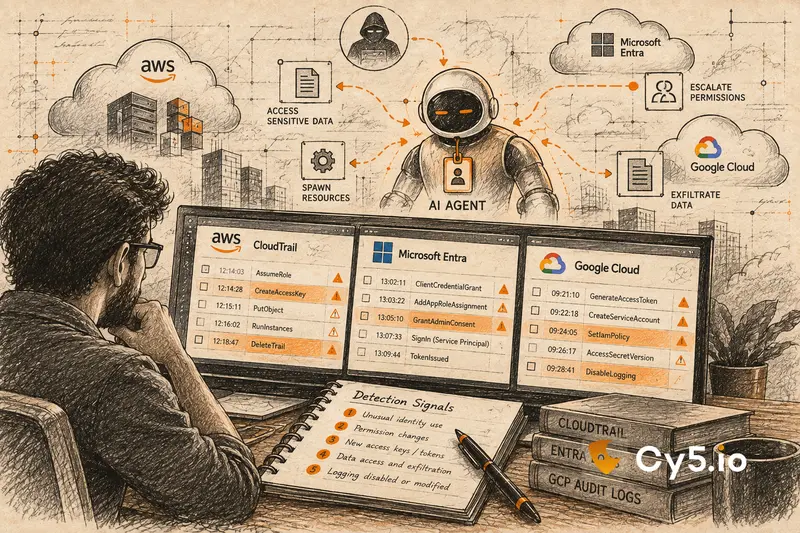

AI agent security is the practice of controlling and monitoring what an AI agent’s identity can do in your environment. From the cloud’s point of view, an agent is not a special kind of object. It is a principal, such as an IAM role, a service principal or a service account, making API calls. The audit log records that identity. It does not record the agent’s intent.
Most writing on AI agent security lists risks at the model layer: prompt injection, tool misuse, data leakage. This post works one layer down. It shows what an agent compromise looks like in AWS CloudTrail, Microsoft Entra and Azure logs, and Google Cloud audit logs, and which of those logs are switched off by default.
Why AI agent security is an identity problem before it is a model problem
Every AI agent authenticates as something. Sometimes that is a purpose-built agent identity. More often it is a plain IAM role, a service principal, a service account or a static API key that someone created for a pilot. The cloud has no idea it belongs to an agent.
That has three consequences.
Attribution is the first casualty. When an agent is manipulated by a prompt, the audit log shows a legitimate principal doing legitimate-looking things. The log can tell you which identity read a table. It cannot tell you that the agent read it because a document told it to.
Agents are less predictable than classic automation. A scheduled job calls the same five APIs every night. An agent chooses its tools at run time, based on what it is asked. Teams respond by writing broad permissions “so it doesn’t break”, and the agent’s normal behaviour is noisier and harder to baseline than a script’s.
The control plane moves faster than scans. A leaked key can go from first use to data access in minutes. A posture scan that runs every 12 or 24 hours sees what happened afterwards, not while it was happening. Detection that matters has to run on the event stream.
None of this makes model-layer controls less important. Guardrails, input filtering and human approval for sensitive actions all reduce risk, and the OWASP AI Agent Security Cheat Sheet is the best single reference for them. But those controls act on the prompt. When one fails, the only record left in your cloud is what the agent’s identity did.
How AI agents get identities on AWS, Azure and GCP
An agent needs credentials in two directions. Inbound credentials decide who may call the agent. Outbound credentials decide what the agent may call: cloud APIs, data stores and SaaS tools. Most of the risk sits on the outbound side, because that is where standing permissions live.
On AWS, IAM roles are the default. A Bedrock agent needs a service role that trusts bedrock.amazonaws.com. Each action-group Lambda function the agent calls has its own execution role, so one “agent” is usually several identities. Agents running on AgentCore Runtime have an execution role, and Amazon Bedrock AgentCore Identity adds a dedicated workload identity with a token vault for the OAuth tokens and API keys the agent uses to reach third-party tools. That reduces hard-coded secrets but adds a new object type to inventory. Pilots still commonly run on IAM user access keys or Bedrock API keys; our guide to Amazon Bedrock security [/blog/aws-bedrock-security/] covers the AWS side in full.
On Azure, most custom agents authenticate as an app registration with a service principal, or as a managed identity. Agents built in AI Foundry typically use a managed identity. Microsoft Entra Agent ID, generally available since April 2026, adds agent identity blueprints, agent identities and agent users, with owners and sponsors. It is the first native “this principal is an agent” label on any of the three clouds, but it applies only to agents built on it. Custom agents on ordinary service principals remain invisible as agents.
On GCP, service accounts are the core machine identity. Vertex AI uses Google-managed service agents plus any service account you attach. Agent Identity for Vertex AI Agent Engine gives each deployed agent its own SPIFFE-based principal with short-lived certificates. When the agent acts for a user, the logs show both identities.
Model Context Protocol (MCP) servers add a further layer. An MCP server acts as an identity broker: the agent talks to the server, and the server calls the cloud or SaaS API with its own credentials. Neither the MCP specification nor any of the three cloud providers defines a way to mark a cloud API call as having come through an MCP server. In the logs, it looks like any other call by whichever identity the server used. We cover this in detail in our guide to MCP server security [/blog/mcp-server-security/], and the full identity picture in our explainer on non-human identities [/blog/non-human-identity/].
What you can and cannot see: the logs that are off by default
Every detection in this post depends on a log that exists, and several of the most important ones are off by default.
| Log source | On by default? | What it gives you for agent identity |
| AWS CloudTrail management events | Yes, 90 days in Event history. A trail or event data store is needed for longer retention and organisation-wide coverage | IAM changes, AssumeRole calls, CreateAccessKey, and Bedrock InvokeModel and Converse |
| AWS CloudTrail data events | No. Needs advanced event selectors and costs extra | S3 GetObject, Lambda Invoke, DynamoDB item access, Bedrock InvokeAgent, InvokeInlineAgent, Retrieve, RetrieveAndGenerate |
| Amazon Bedrock model invocation logging | No | Prompts and responses: the only record of what an agent was asked to do |
| Azure Activity Log | Yes, 90 days. Export with a diagnostic setting | RBAC changes (roleAssignments/write), listKeys actions, resource changes |
| Entra audit and sign-in logs, including service principal and managed identity sign-ins | Visible in the portal for 7 to 30 days depending on licence. Export with a diagnostic setting | App and credential changes; workload sign-ins with IP address, resource and credential key ID |
| Microsoft Graph activity logs | No. Diagnostic setting required | What a service principal did in Graph, such as directory discovery or mail and file access |
| Azure resource logs (Storage, Key Vault, AI Services) | No. Diagnostic setting per resource | Blob reads, Key Vault secret reads, model calls |
| GCP Admin Activity audit logs | Yes, always on and free | CreateServiceAccount, CreateServiceAccountKey, SetIamPolicy, API key creation |
| GCP Data Access audit logs | No, except BigQuery | Object reads, impersonation token minting, most read APIs |
Three points in this table catch teams out most often.
First, on AWS, model invocation itself is visible by default, because InvokeModel and Converse are management events. What the agent then read is not. If your agents read from S3 and CloudTrail data events [/blog/cloudtrail-data-events/] are off, your logs show that the door was opened but not what was carried out.
Second, key-based access to Azure OpenAI and Azure AI Services bypasses Entra entirely. Using a key is not an Entra sign-in, so it never appears in sign-in logs. Retrieving the key does appear, as a listKeys action in the Activity Log. Setting disableLocalAuth on the resource forces every caller through Entra.
Third, on GCP, most of what an agent reads is recorded only if Data Access audit logs are enabled for that service.
What an AI agent compromise looks like, step by step
The most common agent compromise does not involve the model at all. The sequence below follows a long-lived key created for an agent pilot, leaked, then used to reach production data, with the evidence on each cloud.
| Step | What the attacker does | AWS CloudTrail evidence | Azure equivalent | GCP equivalent |
| 0. Setup | Nothing yet. A pilot identity is created with a long-lived key and a broad policy | CreateUser, CreateAccessKey or CreateServiceSpecificCredential; AttachUserPolicy or PutUserPolicy | Entra audit logs: add application, add service principal, certificates and secrets update; or listKeys on an AI Services account | CreateServiceAccount, CreateServiceAccountKey, ApiKeys.CreateKey |
| 1. Validate | Tests the leaked key | sts:GetCallerIdentity from a new IP or ASN; key ID begins AKIA | AADServicePrincipalSignInLogs: new IP address, ServicePrincipalCredentialKeyId identifies the secret. Key-based AI calls do not appear | authenticationInfo.serviceAccountKeyName names the key; requestMetadata.callerIp shows the source |
| 2. Abuse AI services | Runs models on your bill (LLMjacking [/blog/llmjacking/]) | ListFoundationModels, GetModelInvocationLoggingConfiguration, then bursts of InvokeModel and Converse | Not visible in sign-in logs if a key is used; AI Services resource logs if enabled | Gemini or Vertex AI calls; most are in Data Access logs if enabled |
| 3. Discover | Works out what else the identity can do | ListAttachedUserPolicies, ListRoles, GetAccountAuthorizationDetails, SimulatePrincipalPolicy, often with AccessDenied bursts | MicrosoftGraphActivityLogs, if enabled: enumeration of apps, service principals and role assignments | GetIamPolicy, TestIamPermissions, Cloud Asset searches |
| 4. Cross a trust boundary | Moves into a production account, tenant or project | AssumeRole with a role in another account; recorded in both accounts and linked by sharedEventID; later calls show AssumedRole and a new ASIA key | A service principal adds a secret to a more privileged app, then signs in as it; or a sign-in where HomeTenantId differs from ResourceTenantId | GenerateAccessToken on a service account in another project; later calls carry serviceAccountDelegationInfo |
| 5. Reach data | Finds and reads customer data | ListBuckets, GetBucketPolicy; GetObject only if S3 data events are on; DynamoDB Scan is a data event | Storage listKeys; GetBlob in StorageBlobLogs; Key Vault SecretGet | BigQuery table reads (logged by default); storage.objects.get only if enabled |
| 6. Persist | Keeps access or moves data out | CopyObject to an external bucket, PutBucketPolicy, ModifyDBSnapshotAttribute, CreateAccessKey for a new user | New secret or federated identity credential on an app; roleAssignments/write | CreateServiceAccountKey; SetIamPolicy granting roles/iam.serviceAccountTokenCreator |
Three things make this sequence detectable.
Steps 0 and 6 both create credentials. An identity or key created outside your approved deployment pipeline, with no owner tag, is a finding on the day it appears, long before any attacker uses it.
Steps 1 to 3 are behaviour changes. The identity is valid, but it is calling from a new network, calling API families it has never used, and producing permission errors in bursts. None of them depend on the model.
Step 4 is the point where the incident changes size. A key that could only run models becomes an identity inside your production account. A first-ever role assumption across an account boundary is one of the clearest signals available, if someone watches for new edges.
The second pattern: an over-permissioned copilot
The second pattern involves no stolen credential at all.
An internal copilot is deployed with an identity that can read far more than it needs, for example read access to every storage bucket in an account rather than the one it serves. An attacker who has no cloud access plants instructions inside a document the copilot will later process. When a user asks the copilot a normal question about that document, the agent follows the hidden instructions, reads records from an unrelated store and sends them out through a tool it is allowed to use.
Nothing is stolen and nothing is created. The identity is legitimate, the session is legitimate and the permissions were granted on purpose. The OWASP Top 10 for LLM Applications names the two failures involved: prompt injection (LLM01) and excessive agency (LLM06).
On the cloud side, the evidence looks like this. On AWS, the tool role calls GetObject on a bucket it has never read, which is visible only with S3 data events on. On Azure, the managed identity signs in to a storage account (AADManagedIdentitySignInLogs) and reads blobs (StorageBlobLogs). On GCP, the copilot’s service account or agent principal reads a BigQuery dataset it has never touched.
Two controls would have worked here. Before the attack, least privilege: a copilot that has read one bucket in 60 days but can read 400 is a finding on the first day. During the attack, a behaviour rule for first access to a data store: machine identities are stable enough that a new store is worth an alert, even for agents.
The limitation is important. Cloud audit logs show the read. They do not show the prompt. Proving that an injection caused the read needs model invocation logs or agent tracing. Cloud-side detection catches the effect; it does not read the instructions.
Five signals worth building AI agent security detection on
Each of the following is built on events described above. Each also has a common false positive, and tuning for it is most of the work.
1. A new machine identity created outside the pipeline
Watch CreateUser, CreateAccessKey, CreateRole and CreateServiceSpecificCredential on AWS, app and credential changes in Entra audit logs, and CreateServiceAccount and CreateServiceAccountKey on GCP. Alert when the caller is not on an allow-list of pipeline identities, and raise severity when no owner tag appears within a set period or an admin-level policy is attached. Common false positive: sandbox and break-glass accounts, where people create identities by hand legitimately. Scope the rule by account or project.
2. Access granted but never used on an agent identity
Compare granted permissions with used permissions over 30 to 90 days, using IAM Access Analyzer unused access findings on AWS and IAM Recommender on GCP. Microsoft retired Entra Permissions Management, so Azure has no native permission-usage view for RBAC today. Common false positive: agents whose tool use changes from sprint to sprint, and jobs that run quarterly. Use longer windows for agents and scope by resource rather than stripping actions.
3. A role assumption chain that crosses a trust boundary
Track AssumeRole, AssumeRoleWithWebIdentity and cross-account calls on AWS, cross-tenant service principal sign-ins on Azure, and cross-project GenerateAccessToken on GCP. Alert on a new edge, especially into production. Common false positive: hub-and-spoke designs for security tooling, backup and CI, which create many legitimate cross-account edges. Baseline them per source identity.
4. A machine identity acting outside its baseline
Profile each identity over 14 to 30 days: API families, resources, regions, source networks, user agents, hours, call rate and error rate. Alert on first use of IAM or STS APIs, first access to a data store, use from outside the provider’s network, and AccessDenied bursts. Common false positive: deployments and new agent features. Suppress around change windows, and baseline agents on API families rather than exact call sequences.
5. A toxic combination
This is a graph query, not a log rule: an exposed workload that runs as an identity that can read a sensitive data store. Re-evaluate it whenever a security group, policy or tag changes. Common false positive: exposure behind a WAF or authenticated gateway. Model it as lower risk rather than suppressing it. The rule is also only as good as your data classification.
Common questions about AI agent security
AI agent security is the practice of controlling and monitoring what an AI agent can access and do. In the cloud, that means governing the identity the agent authenticates as, because the cloud sees an identity making API calls, not an agent.
Yes, in two main ways. The credentials it uses can be stolen and used directly, or the agent itself can be manipulated through prompt injection into misusing the access it legitimately has.
Excessive permissions. Whether the attacker steals the agent’s credential or manipulates the agent through a prompt, the damage is limited by what the agent’s identity can reach.
Use CloudTrail. Management events record Bedrock InvokeModel and Converse calls by default. Agent calls such as InvokeAgent, and the data the agent reads, need CloudTrail data events. Prompts and responses need Bedrock model invocation logging.
No. Cloud audit logs record which identity called which API on which resource. They do not record the prompt or the instructions that caused the call. To see a prompt injection you need model invocation logging or agent tracing, both of which have to be enabled.
Where a cloud security platform fits
Every cloud already provides useful native tools here. IAM Access Analyzer finds unused access. GuardDuty detects anomalous IAM behaviour and credential use outside AWS. Entra ID Protection offers risk detections for workload identities. Google Security Command Center detects anomalous impersonation and IAM grants, and IAM Recommender suggests right-sized roles. Use them.
What they do not do is correlate across clouds and across signals. Cy5’s ion platform is built for that correlation. It evaluates each control-plane event as it arrives rather than on a scheduled scan, keeps per-identity behaviour baselines for machine identities as well as people, and uses attack path analysis to show how far a compromised identity could travel from where it is now. In the leaked-key sequence above, that means a new source, a burst of discovery calls and a role chain into production are read as one incident on one identity, not three unrelated alerts.
Every agent runs on an identity, and ion governs identities. More on the detection model is in our post on contextual, entity-centric threat detection [/blog/contextual-entity-centric-threat-detection-cy5-ion-cloud-security/] and on the ion platform page.
Three logs to turn on this week
If you do nothing else after reading this, enable these three:
- CloudTrail data events for the S3 buckets your agents read, and for Bedrock agent and knowledge base calls. Data events are charged per event, so scope them to the buckets and resources that matter rather than enabling them account-wide.
- Amazon Bedrock model invocation logging. It records prompts and responses, and it is the only way to show what an agent was asked to do. The logs contain whatever users and documents put into prompts, so store them with the same controls as the data itself.
- GCP Data Access audit logs for the projects where agents run. They can be high-volume and are billed through Cloud Logging, so enable them per service and per project.
The limitation of everything in this post is the one it started with. Cloud logs prove which identity acted, on what, and when. They do not prove why. Identity-based detection will catch a stolen key and an over-reaching agent. Only model-side logging can show the prompt that caused it.