
A note on naming: Microsoft Defender for Cloud is the current product (formerly Azure Security Center / Azure Defender). Many teams still use the legacy names, so both appear in older docs. This guide uses the current terminology and the current CLI.
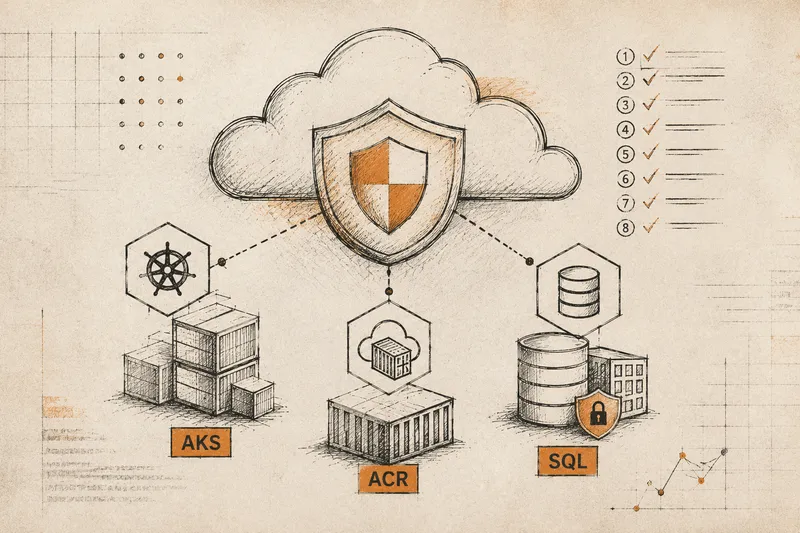
Most cloud incidents trace back to a small cluster of misconfigurations, not exotic zero-days. The fastest win is the 80/20 one: turn on the right Defender plans, lock a handful of high-leverage controls, and verify continuously. In Azure, three surfaces dominate the blast radius – Azure Kubernetes Service (AKS), Azure Container Registry (ACR), and Azure SQL. Weak identity paths, public endpoints, permissive networking, and unscanned images are where attackers go first.
This guide gives you eight concrete Microsoft Defender for Cloud controls across those three surfaces. Each one comes with why it matters, how to test it (Azure CLI or an Azure Resource Graph query), how to fix it, and a clear success criterion. Work through them and you neutralise the bulk of your misconfiguration exposure in an afternoon, not a quarter.
Why the risk concentrates in a few patterns
Attackers take the easiest path. Public endpoints invite brute-force and dictionary auth attacks; unscanned images carry vulnerable or malicious payloads into your cluster; over-permissive clusters let a single compromised pod move laterally. In container- and database-backed apps, that maps to a short list of failure classes: suspicious access through weak authentication, anomalous runtime behaviour, malware in artifacts, and authorization abuse through exposed APIs.
Defender for Cloud surfaces these early through agentless posture assessments and runtime signals, and Azure Policy enforces the baselines such as pod security standards, private endpoints, disabled admin accounts, etc., that block the exploit before the blast radius grows. The controls below are ordered AKS → ACR → SQL so you can move top to bottom.
The Blast-Radius Map: where your Azure risk actually concentrates
Three surfaces carry most of the exposure in container- and database-backed apps. Each has one dominant misconfiguration, one predictable attacker move — and one Microsoft Defender control that shuts it down.
AKS
Azure Kubernetes ServiceACR
Azure Container RegistryAzure SQL
Database / Managed InstanceThe 8 Defender-backed controls
1) Enable Microsoft Defender for Containers
Why it matters. This single plan is the foundation. It provides runtime threat protection for AKS (detecting anomalous pod behaviour, suspicious exec into containers, crypto-mining, and kube-audit indicators) and agentless vulnerability scanning of your registry images and cluster nodes. As of the 2025 consolidation, the old separate KubernetesService and ContainerRegistry plans are deprecated, everything lives under Containers.
How to test.
az security pricing show --name Containers --query pricingTier -o tsvExpected: Standard. For a fleet view of unhealthy Kubernetes assessments across subscriptions, use Azure Resource Graph:
securityresources
| where type =~ 'microsoft.security/assessments'
| where properties.displayName contains 'Kubernetes'
| where properties.status.code !in ('Healthy')
| project subscriptionId, name = properties.displayName, status = properties.status.code
How to fix.
az security pricing create --name Containers --tier StandardThen confirm alerts flow in Defender for Cloud → Workload protections → Containers.
Success criteria. pricingTier shows Standard; no internet-exposed Kubernetes API recommendations outstanding; AKS assessments trend to Healthy.
2) Enforce an AKS baseline with the Azure Policy add-on
Why it matters. The Azure Policy add-on installs Gatekeeper (the OPA admission controller) and enforces the Kubernetes pod security baseline – blocking privileged containers, hostPath mounts, and containers running as root. That removes the most common privilege-escalation footholds. (Note: Kubernetes’ original PodSecurityPolicy was removed in 1.25; the Azure Policy add-on with Gatekeeper is the current mechanism.)
How to test.
az aks show -g <rg> -n <cluster> --query addonProfiles.azurepolicy.enabled -o tsvExpected: true.
How to fix.
az aks enable-addons -g <rg> -n <cluster> -a azure-policyThen assign the built-in initiative “Kubernetes cluster pod security baseline standards for Linux-based workloads” at the cluster or resource-group scope, and set the effect to Deny once you’ve validated in audit mode.
Success criteria. Zero noncompliant resources for “Kubernetes clusters should not allow privileged containers” in Defender recommendations.
Gotcha: Switching network policy or some baseline enforcement can require a node-pool or cluster change depending on your current network plugin and version. Plan a change window.
3) Segment AKS networking (network policy + private API server + authorized IPs)
Why it matters. Network policy limits east-west lateral movement; a private API server and authorized IP ranges make control-plane access deterministic instead of internet-reachable.
How to test.
az aks show -g <rg> -n <cluster> --query networkProfile.networkPolicy -o tsv
az aks show -g <rg> -n <cluster> --query apiServerAccessProfile.enablePrivateCluster -o tsv
az aks show -g <rg> -n <cluster> --query apiServerAccessProfile.authorizedIpRanges -o tsvExpected: a network policy of azure, calico, or cilium; private cluster true; corporate CIDR ranges configured.
How to fix. Recreate or upgrade the cluster with the target network policy, enable the private cluster, and set authorized IP ranges to your corporate egress. (Private cluster and authorized IP ranges are alternative exposure controls, use whichever fits your connectivity model, or both.)
Success criteria. The “Kubernetes API server should not be exposed to the public internet” recommendation clears; the control plane is reachable only via Private Link or approved IPs.
4) Drive ACR image vulnerabilities to zero (MDVM)
Why it matters. Registry image scanning catches vulnerabilities and malware before an image ever reaches AKS. Since 2025 this runs on Microsoft Defender Vulnerability Management (MDVM) – agentless and enabled by default once the Containers plan (control #1) is on. There is no separate plan to enable anymore; the work here is verifying coverage and remediating findings.
How to test.
securityresources
| where type =~ 'microsoft.security/assessments'
| where properties.displayName contains 'container' and properties.displayName contains 'vulnerab'
| summarize unhealthy = countif(tostring(properties.status.code) != 'Healthy')
How to fix. Rebuild affected images on patched base layers, push, and let MDVM re-scan. Gate deployment so images with unresolved critical findings don’t ship – Defender for Containers supports admission-time enforcement for this.
Success criteria. No High/Critical findings outstanding on the “Container registry images should have vulnerability findings resolved” assessment.
5) Constrain ACR access (disable admin user, private endpoint, deny public)
Why it matters. The ACR admin account is a shared credential and a tampering risk. Disabling it, forcing pulls over a private endpoint, and denying public network access enforces least-privilege, identity-based access to your images.
How to test.
az acr show -n <acr> --query adminUserEnabled -o tsv
az acr show -n <acr> --query publicNetworkAccess -o tsv
Expected: false; Disabled.
How to fix.
az acr update -n <acr> --admin-enabled false
az acr update -n <acr> --public-network-access Disabled
Then create an ACR Private Endpoint and restrict the NSGs on its subnet (via Portal, Bicep, or Terraform).
Success criteria. Pulls succeed only via Private Link from approved subnets; public network access is Disabled.
Gotcha: ACR Private Endpoint needs the
privatelink.azurecr.ioprivate DNS zone to resolve from your VNets. Without the DNS plumbing, pulls fail after you lock it down.
6) Enable Microsoft Defender for SQL + Vulnerability Assessment and Auditing
Why it matters. Defender for SQL flags suspicious logins, SQL-injection patterns, and data-exfiltration indicators; Vulnerability Assessment baselines misconfiguration drift; Auditing gives you the who-did-what evidence trail. (The SqlServers plan name is still current, it was not part of the container consolidation.)
How to test.
az security pricing show --name SqlServers --query pricingTier -o tsv
az sql db audit-policy show -g <rg> -s <server> -n <db>Expected: Standard; auditing enabled to Log Analytics, Storage, or Event Hub.
How to fix.
az security pricing create --name SqlServers --tier StandardThen enable Vulnerability Assessment and Auditing on the SQL resource (Portal → Security), directing the audit stream to a Log Analytics workspace.
Success criteria. No High-severity VA findings outstanding; an audit stream landing in your chosen sink.
7) Eliminate public SQL exposure (private endpoint + restrictive firewall)
Why it matters. Disabling public access and forcing traffic over Private Link removes the broad internet attack surface for injection and auth abuse.
How to test.
az sql server show -g <rg> -n <server> --query publicNetworkAccess -o tsv
az sql server firewall-rule list -g <rg> -s <server> -o tableExpected: Disabled; no broad 0.0.0.0 rules.
How to fix.
az sql server update -g <rg> -n <server> --public-network-access DisabledCreate a Private Endpoint and tighten NSGs/UDRs. Make sure “Allow Azure services and resources to access this server” is off.
Success criteria. Only private connectivity is allowed; public endpoints and the “Allow Azure services” exception are disabled.
8) Identity-first SQL (Microsoft Entra ID auth) + TDE with Key Vault
Why it matters. Moving to Microsoft Entra ID authentication removes standing password risk and centralises access governance; keeping SQL logins only for break-glass shrinks the credential surface. Transparent Data Encryption satisfies data-at-rest requirements – it’s on by default with a service-managed key, and you can bring a customer-managed key (CMK) in Key Vault where policy demands it.
How to test.
az sql server ad-admin show -g <rg> -s <server>
az sql db tde show -g <rg> -s <server> -n <db> --query state -o tsvExpected: an Entra ID admin configured; TDE Enabled.
How to fix. Set an Entra ID admin, migrate database principals to Entra ID groups, keep SQL logins for break-glass only, and – where required, store the TDE protector in Key Vault as a CMK with managed rotation.
Success criteria. Entra ID-only operational access; TDE enabled, with a customer-managed key where mandated.
The controls at a glance
8 Microsoft Defender controls, one remediation loop
Work top to bottom — AKS, then ACR, then SQL. Each control is verifiable with one command and confirmed by a single success criterion, so posture is provable, not assumed.
az security pricing show -n Containers...azurepolicy.enabled = truenetworkPolicy · enablePrivateClusteradminUserEnabled · publicNetworkAccessaz security pricing show -n SqlServerspublicNetworkAccess = Disabledad-admin show · tde showVerification runbook and remediation batching
Validate across every subscription with Azure Resource Graph saved queries and track drift to zero on the Defender for Cloud Regulatory Compliance dashboard. ARG is ideal for fleet-level evidence and fast re-checks after each policy deployment.
securityresources
| where type =~ 'microsoft.security/assessments'
| extend status = tostring(properties.status.code)
| where status !in ('Healthy')
| summarize unhealthy = count() by subscriptionId, resource = tostring(properties.resourceDetails.Id)
Prioritise by severity: turn on the Containers and SqlServers plans first, then close networking and access gaps. Schedule the saved queries to re-run on a cadence (Azure Logic Apps or a scheduled GitHub Actions/Azure DevOps job) so posture is checked continuously rather than at audit time. Continuous checks plus a remediation loop are what turn a one-time hardening pass into durable posture.
From alerts to outcomes
Enabling plans is the start; the value is in operating them without drowning in noise. Route Defender for Cloud signals into Azure Monitor and Microsoft Sentinel, then prioritise by context – tag production AKS, ACR, and SQL resources as high-impact and suppress low-risk findings with tuned rules so the team works the alerts that actually reduce risk. Wire high-confidence detections (a failed run of unauthorised ACR pulls, an anomalous SQL login) into response playbooks so containment doesn’t wait on a human.
This is exactly the consolidation Cy5 is built for: agentless, continuous posture visibility with context-based prioritisation, unified with runtime anomaly detection so configuration gaps get fixed alongside live threats — one view instead of a stack of disconnected tools.
The 30-minute hardening checklist
- [ ]
az security pricing showforContainersandSqlServers— enableStandardwhere they’reFree. - [ ] Enable the Azure Policy add-on on production AKS clusters; assign the pod security baseline initiative.
- [ ] Verify AKS network policy, private API server, and authorized IP ranges.
- [ ] Confirm MDVM image scanning is active; drive High/Critical CVEs to zero and gate admission.
- [ ] Disable the ACR admin user; set public network access to Disabled; add a Private Endpoint (with private DNS).
- [ ] Enable SQL Auditing and Vulnerability Assessment to Log Analytics.
- [ ] Set SQL public network access to Disabled; add a Private Endpoint.
- [ ] Configure an Entra ID admin; migrate operational access to Entra groups; keep SQL logins for break-glass.
- [ ] Confirm TDE is enabled; adopt a Key Vault CMK with rotation where required.
- [ ] Save the ARG queries and schedule a recurring drift check.
FAQ
It isn’t mandatory but enabling it gives you behavioural runtime analytics and agentless image scanning that static checks miss, which is where most of the 80/20 reduction comes from. It’s the single most valuable switch in this list.
Image scanning now runs on Microsoft Defender Vulnerability Management and is included with the Containers plan by default – there’s no separate registry plan to turn on since the 2025 consolidation. Confirm the Containers plan is Standard, then check the container image vulnerability assessment in Defender for Cloud and drive High/Critical findings to zero.
Auditing records who did what, where, and when – it’s your evidence and compliance trail. Defender for SQL adds threat detection on top: suspicious login patterns, SQL-injection indicators, and Vulnerability Assessment for misconfiguration. They complement each other for prevention and forensics.
They move exposure off the public internet and onto private address space. You then rely on NSGs, UDRs, and identity policy rather than public firewall rules, and you disable public network access to enforce it.