
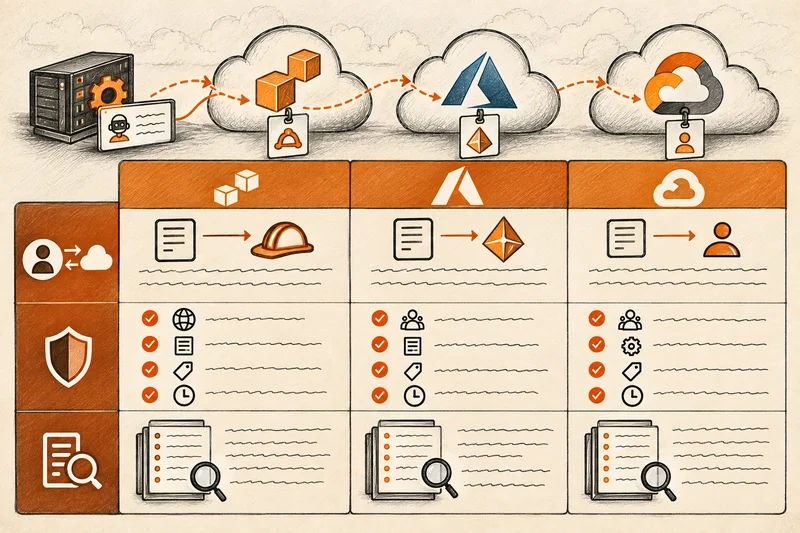

Workload identity federation lets a workload running outside a cloud, such as a CI pipeline, a Kubernetes cluster or a service in another cloud, exchange a token it already has for short-lived cloud credentials, instead of holding a long-lived key. The stored secret disappears. The risk moves into the trust condition that decides which outside tokens the cloud will accept.
AWS, Microsoft and Google document how to set federation up, and their guides are the reference for configuration. This page covers what those guides treat as a footnote: how the trust condition goes wrong, what a loose trust looks like months later, and how to audit the federation you already have on all three clouds.
How workload identity federation works
The mechanism is the same everywhere, with different names.
- The external platform issues the workload a signed token. GitHub Actions, GitLab CI, a Kubernetes cluster and another cloud can all do this, usually as an OpenID Connect (OIDC) token.
- The token carries claims about the workload: an issuer, an audience, and a subject that identifies the specific repository, branch, service account or environment.
- The workload presents that token to the cloud’s security token service.
- The cloud checks the token’s signature against the issuer’s published keys, then checks the claims against the trust configuration you set up.
- If everything matches, the cloud returns short-lived credentials for a specific role, app or service account, and the workload uses them.
This is better than a stored key in three concrete ways. There is no secret to leak from a repository, a CI variable or a laptop. There is nothing to rotate. And the credentials expire on their own, usually within an hour.
What federation does not change is the question of who is allowed in. With a key, that question is “who has the key?” With federation, it is “which tokens match the trust condition?” If the condition is loose, anyone who can get a matching token from the external platform gets the credentials.
Workload identity federation on AWS, Azure and GCP
| AWS | Azure | GCP | |
| Mechanism | IAM OIDC or SAML identity provider, with AssumeRoleWithWebIdentity; IAM Roles Anywhere for workloads with X.509 certificates | Federated identity credential on an app registration or user-assigned managed identity | Workload identity pool and provider, with a Security Token Service token exchange |
| What you configure | A role trust policy with conditions on the issuer’s aud and sub claims | Issuer, subject and audience on each credential; or a claims-matching expression on a flexible credential (preview) | Attribute mapping, attribute conditions on the provider, and IAM bindings to principal:// or principalSet:// identifiers |
| Kubernetes | EKS Pod Identity (AssumeRoleForPodIdentity) or IAM roles for service accounts (IRSA, using AssumeRoleWithWebIdentity) | AKS workload identity, a federated credential that trusts the cluster’s issuer | GKE Workload Identity Federation |
| Where it goes wrong | A wildcard or missing sub condition | A flexible credential with a broad pattern, or a credential trusting the wrong subject | A missing or permissive attribute condition, or a principalSet binding that covers the whole pool |
| Log evidence | AssumeRoleWithWebIdentity in CloudTrail, with the token’s subject | Service principal or managed identity sign-in in Entra sign-in logs | STS token exchange, recorded in Data Access audit logs when those are enabled |
On AWS, you register the external issuer as an IAM OIDC identity provider, then write a role trust policy that allows sts:AssumeRoleWithWebIdentity from that provider. The trust policy’s conditions are the whole security boundary. For GitHub Actions, they check token.actions.githubusercontent.com:aud and token.actions.githubusercontent.com:sub. AWS’s reference for `AssumeRoleWithWebIdentity` is the starting point.
On Azure, you add a federated identity credential to an app registration or a user-assigned managed identity. A standard credential matches the issuer, subject and audience exactly, and Microsoft allows up to 20 per app or identity. Flexible federated identity credentials, in preview for GitHub, GitLab and Terraform Cloud, allow pattern matching through a claims-matching expression instead. Microsoft’s federation concepts page covers the model.
On GCP, you create a workload identity pool and a provider for the external issuer. The provider maps the external token’s claims to Google attributes, including the required google.subject, and applies an attribute condition written in CEL. You then grant IAM roles to a single federated principal:// or to a principalSet:// that matches a group of identities. Google’s Workload Identity Federation documentation covers the details.
The trust condition is the whole security model
With federation, the trust condition does the job the key used to do. Getting it wrong is the most common and most consequential federation mistake.
AWS: the wildcard subject
GitHub’s OIDC token puts the repository and the trigger in the sub claim. A token from the main branch of one repository has a subject like repo:octo-org/octo-repo:ref:refs/heads/main. A trust policy decides which subjects to accept.
A correct condition names the repository and, ideally, the branch or environment:
“StringEquals”: { “token.actions.githubusercontent.com:sub”: “repo:octo-org/octo-repo:environment:production” }
A loose condition uses a wildcard at the organisation level:
“StringLike”: { “token.actions.githubusercontent.com:sub”: “repo:octo-org/*” }
That second condition trusts every repository in the organisation, including one a contractor or a new joiner created this morning, and every branch and workflow in each of them. Anyone who can push a workflow to any repository in the organisation can obtain the role’s credentials. A trust policy with no sub condition at all is worse: it can trust any repository on GitHub that presents the right audience.
GitHub’s own example uses a repository-level wildcard, repo:octo-org/octo-repo:*, which limits trust to one repository but still accepts every branch and pull request workflow in it. For a role that can deploy to production, narrow it to a protected branch or a GitHub environment with required reviewers.
Also check the audience. For GitHub and AWS, the aud condition should be sts.amazonaws.com.
A change in 2026 to watch
For repositories created after 15 July 2026, and for organisations that opt in, GitHub now includes immutable numeric owner and repository IDs in the subject, in the form repo:octo-org@123456/octo-repo@456789:ref:refs/heads/main. This closes a real gap: a repository name can be deleted and re-registered, but an ID cannot. It also means trust policies written for the old format may not match new repositories, and teams under deadline pressure may be tempted to widen a condition to make a deployment work. Update conditions deliberately rather than by adding wildcards.
Pull requests from forks
Be careful with workflows triggered by pull_request_target, which runs in the context of the base repository rather than the fork. If such a workflow can request an OIDC token and checks out code from the pull request, a trust condition that accepts the base repository’s default branch may be reachable by an outsider’s code. Whether a fork can obtain a token depends on the trigger and on repository settings, so test it rather than assuming.
Azure: exact by default, patterns by choice
A standard Azure federated identity credential requires an exact subject match, which is safe by design and awkward at scale. The risk arrives with flexible credentials. An expression such as claims[‘sub’] matches ‘repo:contoso/*’ recreates the AWS wildcard problem. Microsoft’s own example combines a pattern with an exact repository_id check, which is the safer shape.
GCP: the attribute condition
On GCP, the attribute condition on the provider does the filtering. For GitHub, restrict it to your organisation or repository, for example with assertion.repository_owner == ‘octo-org’, or better, compare the immutable repository_owner_id. Then keep the IAM binding narrow: grant the role to the specific principal:// or to a principalSet:// scoped by an attribute such as the repository, not to every identity in the pool. A provider for a public issuer like GitHub with no attribute condition would let any GitHub repository through the pool.
What a loose trust looks like months later
The damage from a loose trust condition often arrives long after it was written.
The pattern is common. A team sets up a CI pipeline to deploy an application or an AI agent during a project, using a federated role with broad permissions and an organisation-wide subject condition. The project ends. The repository is archived. The role remains, with standing permissions, no owner and no activity for months. The trust condition still accepts any repository in the organisation.
Then something in the organisation changes. A new repository is created, a contractor gets write access, or a workflow is copied from an old project. A workflow in that repository requests a token, and the cloud accepts it.
The evidence is specific. On AWS, CloudTrail records AssumeRoleWithWebIdentity for a role that has not been used in months, with a sub value that has never been seen for that role. On GCP, the STS token exchange and the subsequent calls show a federated subject or principalSet member never seen before, if Data Access logs are enabled for the relevant services. On Azure, the dormant app or managed identity appears again in the sign-in logs.
First activity after long dormancy is one of the highest-value identity alerts available, because legitimate dormant identities rarely wake up without a change ticket. For federated roles, add a second check: alert on any subject value the role has not accepted before.
How to audit the workload identity federation you already have
This review can be done with native tools on each cloud. Record the results in one place.
On AWS:
- List every IAM OIDC and SAML identity provider in each account with ListOpenIDConnectProviders and ListSAMLProviders.
- Pull every role’s trust policy with GetAccountAuthorizationDetails, and find the roles that trust those providers.
- Read the sub and aud conditions. Flag StringLike conditions with wildcards at the organisation level, and any trust with no sub condition.
- While reading trust policies, flag roles that trust external AWS accounts without an sts:ExternalId condition.
- Check IAM Roles Anywhere trust anchors and profiles if you use them.
On Azure:
- List federated identity credentials on every app registration and user-assigned managed identity through Microsoft Graph.
- Review the issuer and subject of each. For flexible credentials, read the claims-matching expression and flag broad patterns.
- Flag multi-tenant apps from outside your organisation that hold high-privilege consent in your tenant.
On GCP:
- List workload identity pools and providers in every project.
- Read each provider’s attribute condition. Flag providers for public issuers with no condition, or conditions that do not restrict the organisation or repository.
- Review IAM bindings that reference principalSet:// identifiers, and flag any that cover a whole pool.
Then compare what each trust allows with what has actually used it. On AWS, AssumeRoleWithWebIdentity events in CloudTrail identify the caller as a web identity user, with the token’s subject in the event’s userIdentity details and the target role in requestParameters.roleArn. Group 90 days of these events by role and subject, and you have the real list of repositories and branches that use each role. If a role’s condition accepts repo:octo-org/* but only one repository has ever used it, narrow the condition to that repository. The same comparison works on GCP with the STS and IAM Credentials entries in Data Access logs, and on Azure with the service principal sign-in logs.
Against each federated identity, record three things: who owns it, when it was last used, and what it can reach. A precisely scoped trust to a role with administrator access is still a role with administrator access.
Workload identity federation and AI agents
AI agents increasingly run outside the cloud whose resources they use: in a SaaS agent platform, in another cloud, or on a developer’s machine through an MCP server. They need a way in, and federation is the mechanism that avoids giving them a static key. Microsoft, for example, supports workload identity federation as a way for agents built outside its platform to use Entra Agent ID.
The trust condition question applies unchanged. An agent platform’s token should be trusted only for the specific agent or tenant that needs access, not for everything the platform issues. For how agents get identities more broadly, see our explainer on non-human identities and our guide to AI agent security.
Common questions about workload identity federation
It is a way for a workload outside a cloud to exchange a token from its own platform, such as a GitHub Actions OIDC token, for short-lived cloud credentials, without storing a long-lived key.
Workload identity federation is for software: pipelines, clusters and services. Workforce identity federation, the term Google uses, is for people signing in with an external identity provider. The token exchange is similar; the identities are different.
Usually, yes, because there is no long-lived secret to leak or rotate. But it is only as secure as its trust condition. A wildcard subject can make a federated role easier to reach than a key that is stored carefully.
It is the claim in the external token that identifies the specific workload, such as a GitHub repository and branch or a Kubernetes service account. The trust condition checks it to decide whether to issue credentials.
Yes. Google documents federation from AWS and Azure workloads, AWS accepts OIDC tokens from other providers, and Azure federated credentials can trust external OIDC issuers. Each side still needs its own trust condition.
Where a platform fits
Federation spreads trust relationships across three clouds and several external issuers, and they are rarely reviewed together. Cy5’s ion platform records identities and the trust relationships between them in its entity graph, so a federated role appears with what it can reach and who it trusts. Its event-driven detection evaluates each role assumption as it arrives, which is how a first-ever federation edge or an unexpected subject stands out. See the Cy5 identity and CIEM page.
What federation does not fix
Workload identity federation removes the stored secret. It does not remove the standing permission behind it. A perfectly written trust condition in front of an over-privileged role is still an over-privileged role, and a stolen CI runner or a compromised repository inside the trusted scope can use it. Review the permissions as carefully as the trust. And if the Data Access logs for token exchange, or the sign-in logs for federated identities, were not being kept, there is no way to reconstruct later which external identities used a role.