

Microsoft Entra Agent ID gives AI agents their own identity objects in Microsoft Entra, with a named sponsor accountable for each, instead of leaving them to authenticate as ordinary service principals. It is a real improvement in how agents are identified and governed on Azure and Microsoft 365.
It also has a boundary that matters for any security team. Entra Agent ID governs the agents that are registered with it. Every agent that still runs on a plain service principal, a managed identity or an API key stays invisible as an agent. This guide explains what Entra Agent ID introduces, how it compares to AWS and Google Cloud, and where that boundary sits.
What Entra Agent ID introduces
Entra Agent ID was previewed at Microsoft Build in May 2025. Microsoft’s product overview now lists it as generally available to all Microsoft Entra customers. It adds three new kinds of object to the directory.
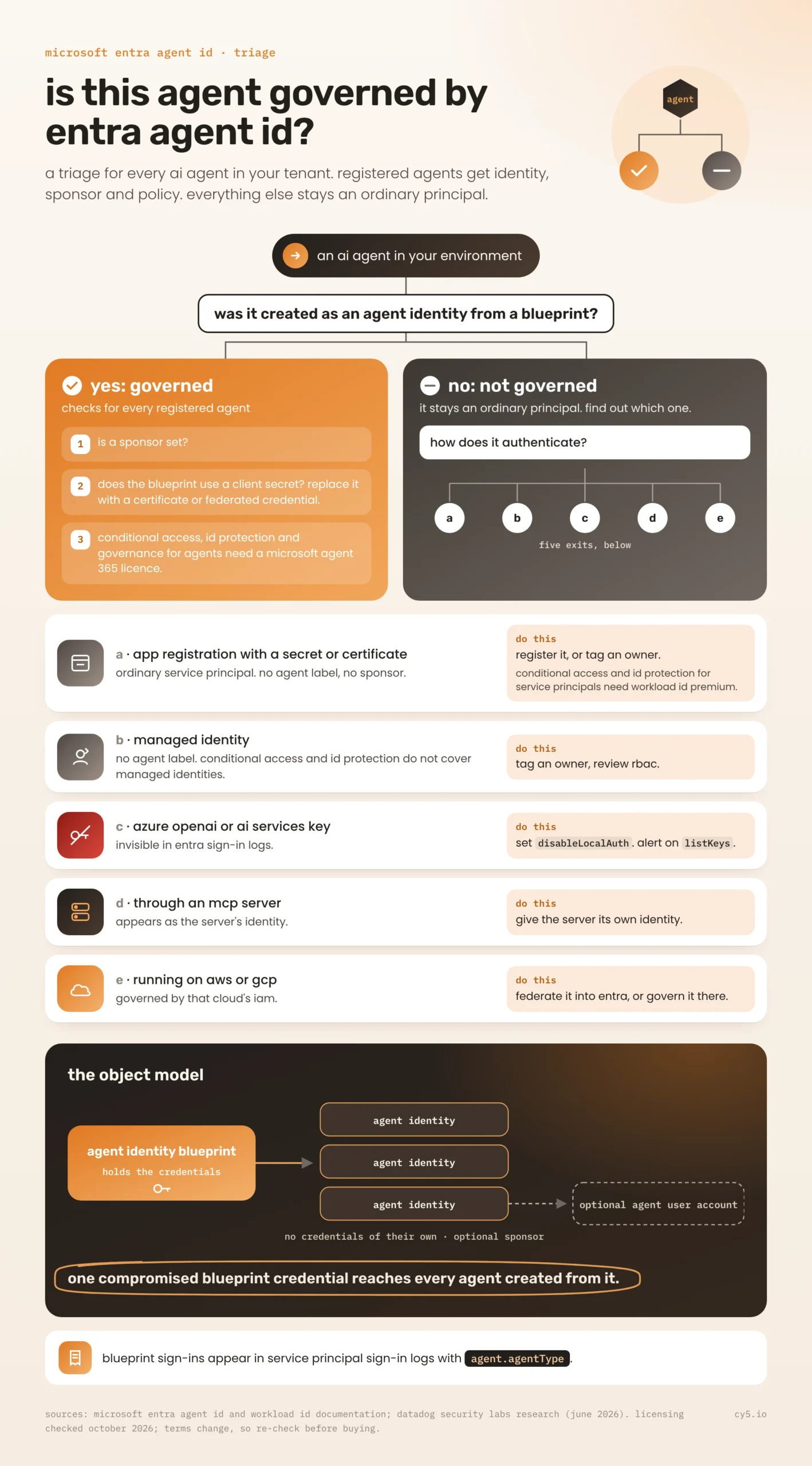
An agent identity blueprint is a reusable template that defines a kind of agent. It records what all agents of that kind share: the blueprint name, the publishing organisation, the roles its agents offer, and the Microsoft Graph permissions granted to them. For security, the most important point is that the blueprint is the object that holds credentials: federated identity credentials, certificates or client secrets.
An agent identity is a special kind of service principal created from a blueprint. According to Microsoft’s documentation on agent identities, it has no credentials of its own. The blueprint is authorised to impersonate it, and tokens are issued to the agent identity through the blueprint. Each agent identity has its own object ID, a display name and an optional sponsor: the person or group accountable for the agent, and the contact when something goes wrong.
An agent’s user account is optional. Some systems only accept Microsoft Entra user accounts, so an agent identity can be paired one-to-one with a user account that is marked as an AI agent.
Agent identities can request tokens in their own right, where the token’s subject is the agent, or on behalf of a user, where the subject is the user and the agent is recorded as the actor. That second pattern is the one that makes attribution possible: a log can show both who asked and which agent acted.
Microsoft also says the platform supports agents built outside its own products, including agents running on AWS Bedrock, through its authentication SDK or workload identity federation. The directory label is not limited to Copilot Studio or Azure AI Foundry, provided the agent is registered.
How Azure agents authenticated before this
Before Entra Agent ID, an AI agent on Azure authenticated like any other workload, and most still do.
Managed identities are service principals whose credentials Azure manages. They are the safest option, because nothing is stored in code, and they appear in Entra sign-in logs as managed identity sign-ins.
App registrations with service principals are how most custom agents and copilots authenticate. They carry client secrets or certificates, and developers copy those secrets into configuration files, notebooks and, increasingly, MCP server settings.
Workload identity federation lets an app registration or user-assigned managed identity trust tokens from GitHub, Kubernetes or another cloud without a stored secret. It removes the secret, but the risk moves to the subject and issuer rules that decide which external tokens are trusted.
None of these tells you that a principal belongs to an AI agent. From the directory’s point of view, a copilot’s service principal and a backup job’s service principal are the same kind of object. That is the gap Entra Agent ID fills, for the agents that use it.
How Entra Agent ID compares to AWS and GCP
All three major clouds now offer a purpose-built identity for AI agents. They solve related problems in different ways.
| Azure | AWS | GCP | |
| Native agent identity | Entra Agent ID: agent identity blueprints, agent identities and optional agent user accounts | Bedrock AgentCore Identity: workload identity, inbound JWT authorizer, outbound credential providers with a token vault | Agent Identity: a SPIFFE-based principal per agent, with short-lived X.509 certificates and bound tokens |
| Status (September 2026) | Generally available | Generally available | Preview for most services, per Google’s documentation |
| Marks the principal as an agent | Yes, for registered agents | Partly: agent identities are a new object type, but the IAM roles the agent also uses remain ordinary roles | Yes, per deployed agent |
| Where credentials live | On the blueprint; agent identities have none of their own | The agent’s execution role, plus a token vault for third-party credentials | Auto-provisioned certificates; no long-lived keys, and the identity cannot be impersonated |
| Accountability model | Sponsors and owners | Tags | IAM bindings on the agent’s principal |
| Agents that do not use it | Invisible as agents | Invisible as agents | Invisible as agents |
The last row is the important one. Each cloud’s agent identity is a good design for the agents that adopt it. None of them can tell you which of your existing service principals, IAM roles or service accounts are really agents. Those were created before the new services existed, or by teams that never used them, and they look exactly like every other machine identity.
The design differences also matter. Azure puts the credentials on the blueprint, which keeps them off the individual agents but makes the blueprint a high-value target. Google avoids long-lived credentials entirely. AWS keeps IAM roles as the permission boundary and adds a vault for tokens to outside services.
What Entra Agent ID does not cover
Entra Agent ID is only as complete as your registration of agents in it. Several common patterns fall outside it.
Custom agents on ordinary service principals. An agent a team built last year on an app registration with a client secret is still a normal service principal, with no sponsor and no agent label, until someone migrates it.
Agents using Azure OpenAI or Azure AI Services account keys. Key-based access bypasses Microsoft Entra ID entirely. Using a key is not an Entra sign-in, so it does not appear in sign-in logs at all. What does appear is retrieving the key: Microsoft.CognitiveServices/accounts/listKeys/action in the Azure Activity Log. Setting disableLocalAuth on the resource forces every caller through Entra, which is the only way those calls become attributable.
Agents behind MCP servers. When an agent calls tools through an MCP server, the downstream API sees the server’s credentials, not the agent’s. Unless the server itself runs as a registered agent identity, the agent never appears. Our guide to MCP server security covers this pattern.
Agents running on AWS or GCP that are not federated into Entra. Their identities live in the other cloud’s IAM.
The blueprint’s own risk. Because blueprints hold the credentials and many agent identities can hang off one blueprint, a compromised blueprint credential affects every agent created from it. Datadog Security Labs’ analysis of the blueprint blast radius found that this can extend across tenants for multi-tenant blueprints. Their recommendation is to replace blueprint client secrets with certificates or federated credentials.
What changes for detection and logging
Agent identities are service principals, so their activity appears where service principal activity already does. Datadog’s detection guidance shows blueprint sign-ins in the service principal sign-in logs, with an agent.agentType property identifying the blueprint principal and clientCredentialType showing whether a client secret was used. Credential changes on a blueprint appear in the Entra audit logs as the familiar “Update application – Certificates and secrets management” activity.
The retention reality is unchanged. Entra audit and sign-in logs are kept in the portal for 7 to 30 days depending on licence. To keep them longer or query them properly, you need a diagnostic setting that sends AuditLogs, AADServicePrincipalSignInLogs and AADManagedIdentitySignInLogs to Log Analytics or a SIEM. Microsoft Graph activity logs, which show what a service principal actually did in Graph, are off by default and need their own diagnostic setting.
Licensing needs checking before you plan around any feature. Microsoft’s overview, checked in September 2026, states that the agent identity platform itself is available to all Microsoft Entra customers. Conditional Access, ID Protection and governance features for agents require a Microsoft Agent 365 licence, which Microsoft lists as included with Microsoft 365 E7 and available as an add-on to certain E5, A5 and Business Premium plans. For ordinary service principals, Conditional Access and ID Protection risk detections require Microsoft Entra Workload ID Premium, and they do not cover managed identities.
Common questions about Entra Agent ID
It is Microsoft Entra’s identity platform for AI agents. It adds agent identity blueprints, agent identities and optional agent user accounts to the directory, so agents authenticate as agents, with a sponsor accountable for each.
Yes. It was previewed at Build 2025 and became generally available in April 2026. Microsoft’s documentation lists it as available to all Microsoft Entra customers.
An agent identity blueprint is a template that defines a kind of agent and creates agent identities from it. It holds the credentials, and the agent identities created from it authenticate through it.
It can. Microsoft supports non-Microsoft agents, including ones on AWS Bedrock, through its authentication SDK or workload identity federation. They are covered only if someone registers them; unregistered agents remain ordinary service principals or identities in another cloud.
The agent identity platform is available to all Microsoft Entra customers. Conditional Access, ID Protection and governance for agents require Microsoft Agent 365, according to Microsoft’s documentation in September 2026. Check current terms before purchasing, as they change.
Governing the agents Entra Agent ID cannot see
Entra Agent ID solves the labelling problem for registered agents. The unregistered ones are still there, running as service principals, managed identities and keys on Azure, and as roles and service accounts on AWS and GCP.
That is where a cross-cloud identity view helps. Cy5’s ion platform keeps a live inventory of human and machine identities across Azure, AWS and GCP in its entity graph, with the resources each can reach, and compares granted with used permissions for each one. It does not need to know which identities are agents to find the unowned service principal with a client secret and broad access, which is usually where the risk is. Every agent runs on an identity, and ion governs identities. See the ion platform overview and our explainer on non-human identities.
Limitations and when this was checked
Agent identity products are changing monthly. This page describes Entra Agent ID, AgentCore Identity and Google’s Agent Identity as documented in September 2026, and it will be updated as they change. Treat Microsoft’s own documentation as the authority for configuration. Our comparison is about coverage and governance, not a replacement for it. And note what no identity label can tell you: why an agent took an action. That still needs the agent’s own logs or tracing.