
Real-time CSPM, also called event-driven CSPM, rescans a cloud resource when its configuration changes instead of waiting for the next scheduled scan. In AWS, the trigger is the API call that CloudTrail records. ion by Cy5 reads that event, raises an alert and rescans only the resource that changed.
Key takeaways
- A scheduled scan looks back. An event-driven rescan reacts to the API call that made the change.
- The floor on “real time” is how fast the cloud delivers its audit log, not how fast the tool scans.
- Rescanning one resource keeps cost and noise down, and ties each alert to its finding.
- Scheduled discovery still runs. Event-driven scanning adds to it; it doesn’t replace it.
What is real-time (event-driven) CSPM?
Real-time CSPM is cloud security posture management that reacts to configuration changes as they are logged, rather than on a timer. Someone opens a security group, attaches an IAM policy or removes an S3 public-access block. The cloud writes that call to its audit log. An event-driven CSPM reads the log, recognises the change and checks the affected resource again.
A scheduled scanner works more like a camera on a timer. If the shutter fires every six hours, every picture shows the account as it was up to six hours earlier. Classic CSPM pulls on a clock: every hour, every six hours or every day, it walks the account and compares what it finds with a benchmark such as the CIS AWS Foundations Benchmark. Event-driven scanning is pushed by the change itself. The cloud says something moved, and only then does the tool look.
In AWS, that change log is AWS CloudTrail. It records API activity whether the change came from the console, the CLI or an SDK. Every event-driven posture pipeline on AWS, ion’s included, starts from that record.
Scheduled scans vs event-driven scans: what’s the difference?
A scheduled scan gives you a full, periodic picture of the account. An event-driven rescan gives you a fresh look at one resource the moment it changes. You want both, because each one catches what the other misses.
| Aspect | Scheduled scan | Event-driven rescan |
|---|---|---|
| Trigger | A clock (every N hours) | A configuration-change API event |
| What gets scanned | The whole account or service | Only the resource that changed |
| Average wait before a new change is seen | Half the scan interval | Log delivery plus processing |
| Worst-case wait | The full scan interval | Log delivery plus processing (neither is guaranteed) |
| Depends on | The scheduler and API quotas | CloudTrail being on in every account and region |
| Still needed for | Baseline discovery, risks that aren’t change events, new benchmark checks | Reacting to a specific change in a specific resource |
The arithmetic for scheduled scans is short. If changes land at random times, the average wait before a scan notices one is half the interval. The worst case is the full interval.
| Scan interval | Average wait before a new change is seen | Worst-case wait |
|---|---|---|
| 24 hours | 12 hours | 24 hours |
| 12 hours | 6 hours | 12 hours |
| 6 hours | 3 hours | 6 hours |
| 1 hour | 30 minutes | 1 hour |
Find your row. That is how long a newly opened security group or a newly public bucket can sit unscored. Shortening the interval narrows the window, but you pay for it in API calls and dashboard churn. Event-driven rescanning takes the clock out of the sum and puts log-delivery time in its place. If you want the wider design argument, it’s in event-driven cloud security architecture.
What happens after a security group changes? Step by step
Take one change and follow it through ion.
14:02:10 · An engineer adds an inbound rule to
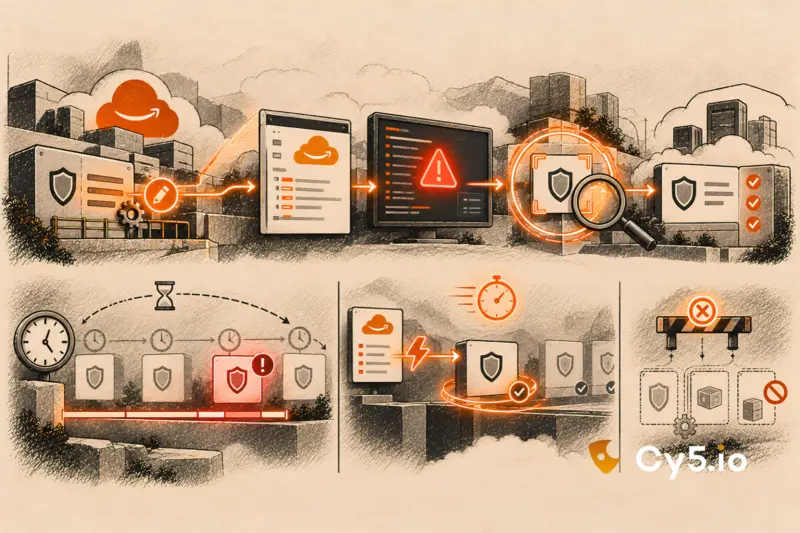
sg-0a1b2c3dallowing TCP 22 from0.0.0.0/0(AuthorizeSecurityGroupIngress). [T+?] · CloudTrail records the call and delivers the log to S3 (AWS: about 5 minutes on average, not guaranteed). [T+?] · ion’s SIEM parses the event. A detection rule raises “Security group opened to the internet”, namingsg-0a1b2c3d. [T+?] · ion’s CSPM rescanssg-0a1b2c3d, and nothing else. [T+?] · A finding appears in Posture Monitoring with its severity and the control it fails. Later · The engineer removes the rule. The analyst runs Live Scan on the same group, Scan History shows Completed, and the finding moves to remediated.
What limits the speed is how quickly the cloud delivers the log. How often someone has scheduled a scan doesn’t come into it.
[DIAGRAM 1: five-step flow: Change → CloudTrail → ion SIEM → targeted CSPM rescan → finding] Alt text: Diagram of an AWS configuration change flowing through CloudTrail, ion’s SIEM and a targeted CSPM rescan to a posture finding.
Here are the five steps in more detail.
- The change is made and CloudTrail records it. It could be a security group, an IAM policy, an EC2 instance or an S3 bucket. CloudTrail captures the event name, who made the call, which resource it touched and the request parameters.
- The log reaches ion’s SIEM through S3. ion collects the log from the trail’s S3 bucket, parses it into a common format, enriches it with account and resource context, and stores it. If you’re deciding which events deserve attention beyond management events, see CloudTrail data events.
- A detection rule recognises the change and raises an alert. The alert names the resource (
sg-0a1b2c3d) and the event behind it. Analysts find it underDetection & Response → Detections. [SCREENSHOT 2: Detections list showing the configuration-change alert] Alt text: ion Detections list with a security group change alert and the resource ID visible. - The SIEM asks the CSPM to rescan that one resource. It passes the account, the resource type and the resource ID. The rest of the account is left alone until the next discovery scan.
- The CSPM checks the new configuration and records a finding. The finding shows on the dashboard with its severity and the benchmark control it fails, in this case the rule against unrestricted SSH ingress from the internet. [VERIFY: control number and benchmark version shown in ion’s finding] [SCREENSHOT 4: Finding in Posture Monitoring with severity and failed control] Alt text: ion Posture Monitoring finding showing severity, the failed benchmark control and the security group ID.
The analyst ends up with two linked records. The alert says what changed. The finding says whether the change is a risk. For why that pairing matters when several findings combine into one attack path, see the CNAPP correlation engine.
How fast is “real time” in practice?
The floor is set by log delivery. AWS says it plainly: “CloudTrail typically delivers logs within an average of about 5 minutes of an API call. This time is not guaranteed.” Parsing, detection and the rescan all happen after that.
So we don’t quote one number for how fast ion sees a change. The accurate answer is: as fast as AWS delivers the log, plus the time to parse it and rescan one resource. A daily scheduled scan runs on a different clock entirely, with an average wait of twelve hours and a worst case of a day.
Some teams need to react faster than log delivery allows. They route CloudTrail management events through Amazon EventBridge and act on specific API calls there. That path has its own delivery behaviour and trade-offs, and it isn’t how ion’s documented flow works.
Why rescan one resource instead of the whole account?
Cost is the obvious reason. A full scan touches every resource, uses API quota and moves the dashboard whether or not anything meaningful changed. A targeted rescan touches one security group.
The less obvious reason is context. The SIEM alert tells you what changed, who changed it and when. The CSPM finding tells you whether the new state fails a control. Read separately, each one is half an answer. Read together, they give the analyst something to act on: this identity opened this AWS security group at this time, and the result fails the unrestricted-SSH check. That is enough to triage, assign and fix. Storage follows the same pattern, as covered in misconfigured AWS S3 buckets.
The events worth watching are the ones that cross a trust boundary:
AuthorizeSecurityGroupIngressandRevokeSecurityGroupIngressPutBucketPolicy,PutBucketAclandDeletePublicAccessBlockAttachRolePolicy,PutRolePolicyandCreateAccessKeyModifyDBInstance
Each of these can be routine automation or a step towards exposure. The posture check that follows decides which.
How do you verify a fix without waiting for the next scan?
Use Live Scan. It runs a targeted scan of resources you pick, when you pick them, so you can confirm a fix before you close the ticket.
- In ion, open
Posture Monitoring → Activity → Scan. - Choose the cloud provider, the account and the resource type.
- Select the resources to rescan, such as the security group you just edited.
- Click
Initiate Scan. Progress and time taken appear inScan History.
[SCREENSHOT 6: Live Scan selection screen] Alt text: ion Live Scan screen with cloud provider, account, resource type and resource selectors.
[SCREENSHOT 7: Scan History showing Completed and time taken] Alt text: ion Scan History list with a completed Live Scan and its elapsed time.
When the scan completes, the finding either clears or updates to the new state. The ticket closes with evidence attached, not with a promise that tomorrow’s scan will confirm it.
What event-driven scanning can’t see
Here is where this approach stops working, and why scheduled scans stay in place.
- It needs CloudTrail switched on everywhere that matters. No trail in a region or account means no event to react to. Start with an organisation trail covering all regions, including the ones you think you don’t use.
- Log delivery takes time, and AWS doesn’t guarantee how long. It publishes an average of about five minutes. A late log means a late rescan.
- Not every risk starts with a change. A newly published CVE affecting an untouched EC2 instance won’t produce a CloudTrail event. Nor will a benchmark update that turns yesterday’s acceptable setting into a failure. Scheduled discovery catches those.
- ion’s documented real-time flow is for AWS. On Azure, GCP and OCI, ion monitors posture through scheduled discovery scans.
A buyer who is told a tool has no gaps will find the first one in production. It’s better to know them up front.
Why this matters if you report to CERT-In
The CERT-In Directions of 28 April 2022 require covered entities in India to report specified cyber incidents within 6 hours of noticing them, and to keep logs for 180 days.
The six-hour clock starts when you notice. A daily scan doesn’t break that rule, but it does decide when noticing happens. Put the rule next to the arithmetic. With a 24-hour scan interval, a misconfiguration waits 12 hours on average, and up to 24, before it becomes a finding anyone can act on. During that time the exposure is live and the clock hasn’t started. Shortening the interval narrows that window. Rescanning on the change event narrows it to the time the cloud takes to deliver the log.
Work out your own scan gap
The quickest way to see whether this matters for you is to run your own numbers. The Scan-Gap Calculator takes your scan interval and a rough count of risky changes per day. It returns the average and worst-case time a new misconfiguration sits unseen, and compares that with log delivery.
Prefer to see it on your own CloudTrail? Book a 15-minute diagnostic. For the wider product, see ion’s CSPM.
Frequently asked questions
No. Real-time CSPM reacts to configuration changes and tells you whether the new state fails a posture control. Cloud detection and response (CDR) looks for threat behaviour, such as unusual API calls or misuse of an identity. Both read CloudTrail, but they answer different questions. ion’s SIEM handles threat detection, and the same pipeline triggers posture rescans.
Does event-driven scanning replace scheduled scans?
No. Event-driven scanning adds a targeted rescan when a resource changes. Scheduled discovery still matters, because some risks never produce a change event: a new CVE on an untouched workload, a benchmark update, or a resource in a region without a trail. Running both lets each cover the other’s blind spots.
The ones that cross a trust boundary. Examples include AuthorizeSecurityGroupIngress, PutBucketPolicy, PutBucketAcl, DeletePublicAccessBlock, AttachRolePolicy, PutRolePolicy, CreateAccessKey and ModifyDBInstance. Any of them can be routine or risky. The posture check that follows the event tells you which, so read the alert and the finding together.
ion’s documented event-driven scanning flow is for AWS, and it reads from CloudTrail. ion monitors posture on Azure, GCP and OCI through scheduled discovery scans. If real-time coverage on another cloud matters to you, ask any vendor which audit log they read and how quickly that log arrives.
Live Scan is an on-demand scan of resources you choose, started from Posture Monitoring → Activity → Scan. You pick the provider, the account, the resource type and the resources, then start the scan. Scan History shows progress and time taken. Teams use it to confirm a fix straight away instead of waiting for the next scheduled scan.
It is as fast as the cloud delivers its audit log, plus the time to parse the event and rescan one resource. AWS says CloudTrail delivers logs within about five minutes on average and doesn’t guarantee it. Any honest speed figure for event-driven CSPM on AWS starts from that floor.
ion includes a SIEM that parses, normalises and stores CloudTrail events and runs detection rules on them. Whether you also keep an enterprise SIEM depends on your other log sources, your retention obligations and your SOC’s workflow. For posture, ion’s SIEM is the part that turns an API call into a targeted rescan.
Changes in that region never reach the detection pipeline, so no event-driven rescan fires. Scheduled discovery still finds the resources, but only on its clock. The fix is an organisation trail with every region enabled, since anyone with permission can create resources in any region.
Sources
- AWS, CloudTrail User Guide: https://docs.aws.amazon.com/awscloudtrail/latest/userguide/cloudtrail-user-guide.html
- AWS, View your log files (log-delivery timing): https://docs.aws.amazon.com/awscloudtrail/latest/userguide/tutorial-trail-logs.html
- CERT-In, Directions under section 70B(6) of the IT Act, 2000 (28 April 2022): https://www.cert-in.org.in/PDF/CERT-In_Directions_70B_28.04.2022.pdf [VERIFY]
- Center for Internet Security, CIS Amazon Web Services Foundations Benchmark: https://www.cisecurity.org/benchmark/amazon_web_services